Use coupon code:
 Something exciting is coming soon – stay tuned to find out! 🚀✨

-
Comparison
-
Nov 12, 2026
-
Nov 12, 2026
-
5
-
0
- Next blog »
Searching for an event management plugin on WordPress.org and seeing Event Genius near the top? It's worth a closer look before you install it. Both plugins put events, registrations and payments on your own WordPress site. The gap opens up when you need more than a sign-up form: a phone app for the door, tickets with QR codes, a link to your CRM, or a theme built for events.
In this Event Genius vs WP Event Manager comparison, we look at features, ticket selling, check-in, marketing tools, virtual events, themes, support and pricing. Everything about Event Genius comes from its own website and its WordPress.org page. So if you're after an Event Genius alternative, you'll find the details you need here.
Event Genius vs WP Event Manager: Overview
What is Event Genius?
Event Genius is a newer plugin from a team of the same name. It's built mainly around registration. The free version gives you event pages, a registration form builder, RSVPs, capacity limits, recurring events and list, month and grid views. It can also import events from The Events Calendar.
Payments, waiting lists, and check-in are part of its paid plans. Its WordPress.org page shows 600+ active installations and 17 reviews.
What is WP Event Manager?
WP Event Manager is a free event management plugin on WordPress.org, made by a team with over nine years of experience in event software. The free core already covers event listings with search filters, a frontend form for submitting events, organiser and venue pages, and a dashboard where organisers manage their own events.
On top of that, you can add any of 42 premium addons across four groups: feature, ticket selling, marketing, and virtual events. There's a dedicated Event Check-in app for Android and iOS, 28 event themes, and a translation into 34 languages. Today, more than 30,000 organisers run their events on WP Event Manager.
Event Genius vs WP Event Manager: Comparison at a Glance
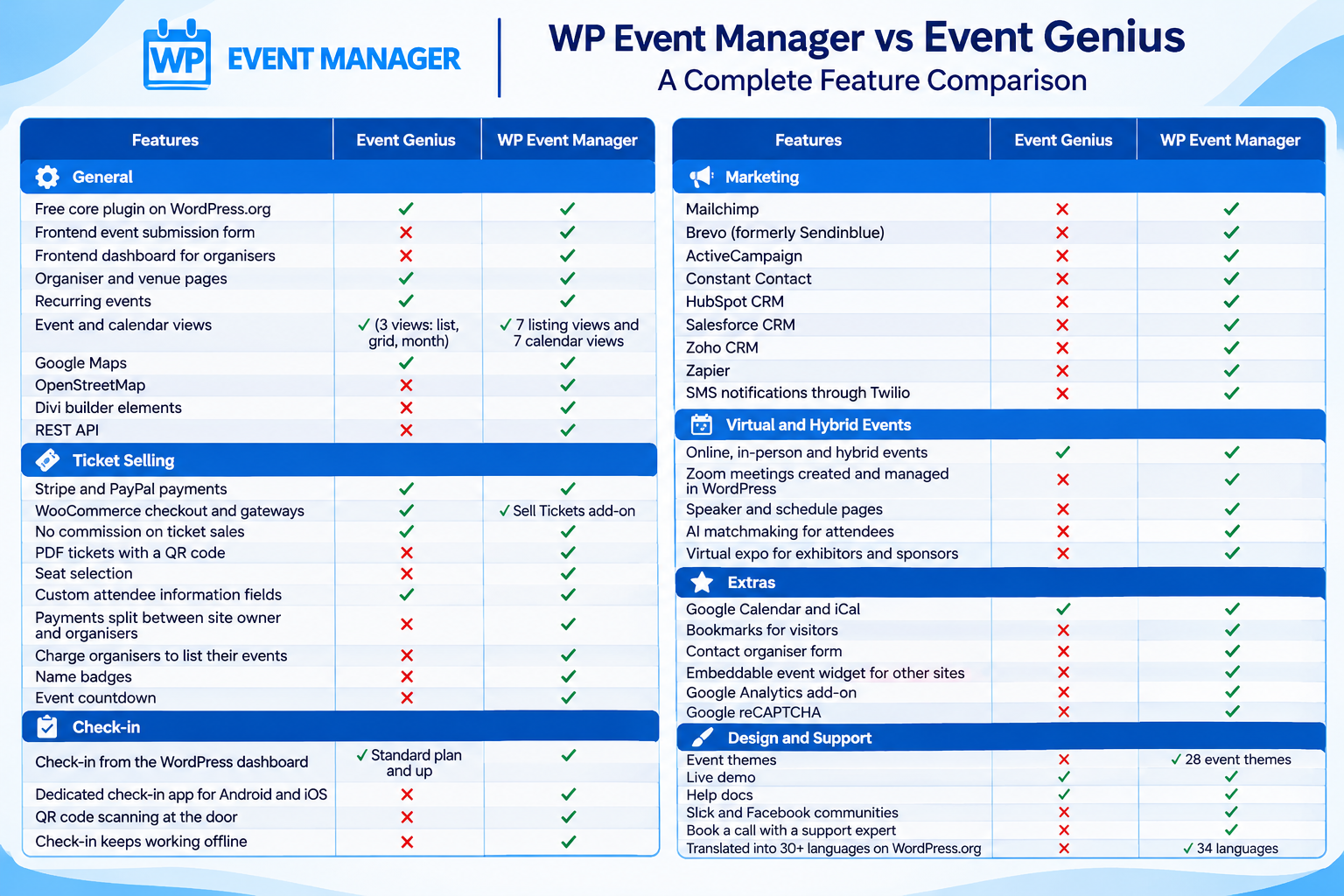
Which Plugin Gives You More Features?
Event Genius keeps its focus on one job: getting people registered. Its features list covers forms, attendee lists, emails, recurring events, and calendars. Everything else is unlocked by moving up its four paid plans.
WP Event Manager starts with a free core and lets you add only the features your events need. With 42 add-ons to pick from, it handles jobs that Event Genius doesn't list at all:
- Running an event directory? Other people can post their events through the frontend form and manage them from their own dashboard.
- You can charge them for each listing with Woocommerce paid listing, and Stripe Split Payment sends each organiser their share of ticket sales.
- Visitors can save events with Bookmarks or message the host through Contact Organizer.
- Prefer open map data? There's an OpenStreetMap add-on next to the Google maps one.
- Developers get a Rest API add-on , and Divi users get ready-made Divi Elements.
Admins still stay in control. Every submitted event can be reviewed and approved from the backend before it goes live.
Which Plugin Sells Event Tickets Better?
Event Genius doesn't take a cut of your sales. Payments come with its paid plans, though, and they're spread out: PayPal and offline payments start on Basic, Stripe needs Standard, and WooCommerce with its gateways is only in the Advanced plan. Buyers get a PDF invoice. Its site doesn't mention PDF tickets or QR codes.
WP Event Manager's sell tickets add-on handles paid, free and donation tickets with zero commission. It runs on WooCommerce, so you can take payments through 100+ gateways from a single add-on. Each buyer gets a PDF e-ticket with a QR code, ready to be scanned at the door.
There's more around the sale too. Registrations covers free events and RSVPs, Attendee Information lets you ask custom questions at checkout, and WP Seats lets buyers pick their own seats. You can print Name Badges for the day and add an Event Countdown to push early sales.
Which Plugin Has the Better Check-in App?
Event Genius doesn't have a mobile app. Check-in comes with the Standard plan and up, and it works from a screen inside WordPress. Staff looks up each attendee by name, email or confirmation code and marks them present. Its site doesn't mention QR scanning or offline use.
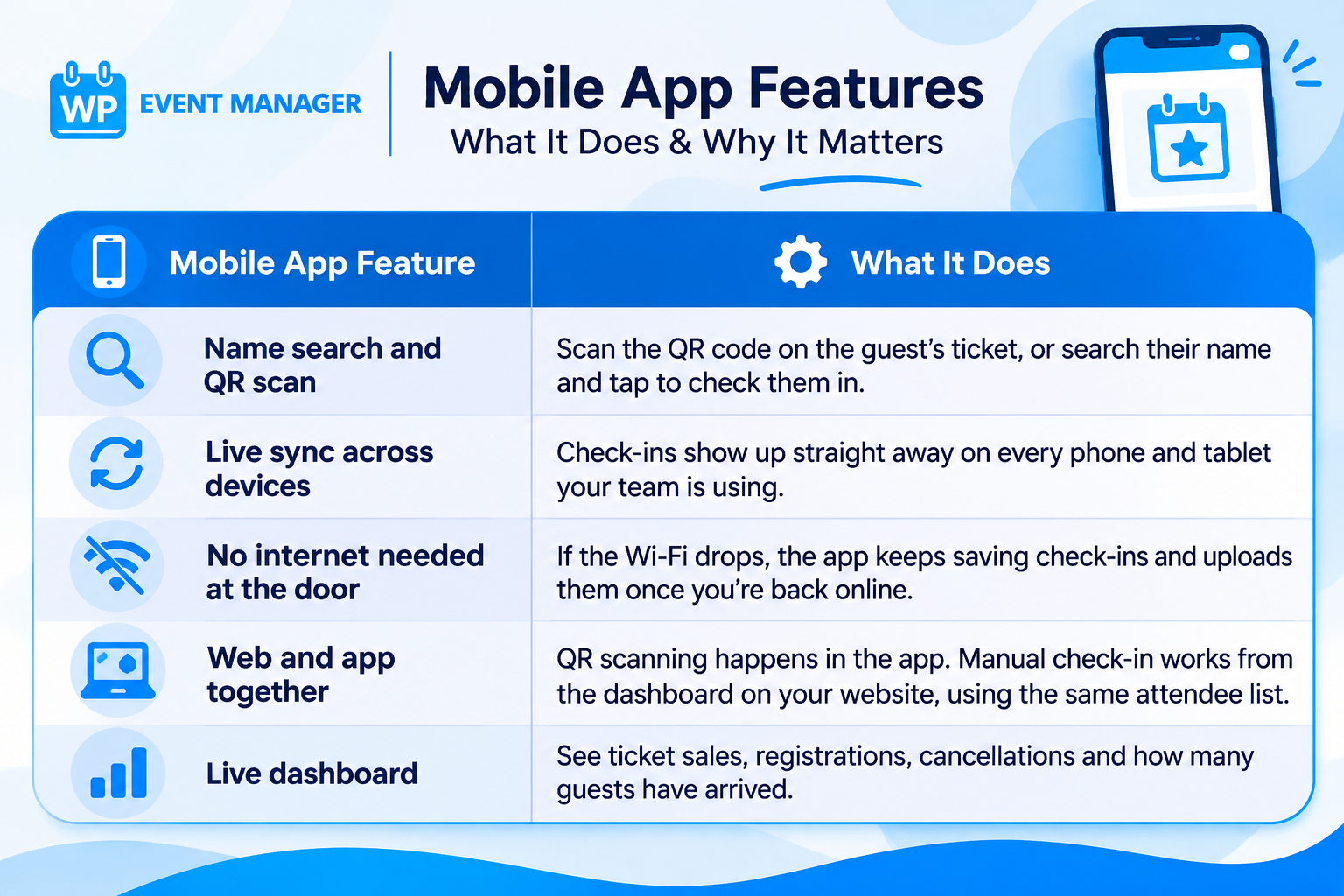
WP Event Manager has a dedicated event check-in app on Google Play and the App Store, connected through the Event App add-on. It's made for a busy entrance where every second counts.
Which Plugin Connects With More Marketing Tools?
Event Genius sends confirmation, reminder and follow-up emails from WordPress. Its Premium plan adds outgoing webhooks. Its pages don't name any email marketing service, CRM, or SMS tool.
WP Event Manager connects straight to Mailchimp, Brevo, Active Campaign, Constant Contact, Hubspot CRM, Salesforce CRM and Zoho CRM. Each one has its own add-on, so attendee details land in your list or CRM without a middle tool.
Want to reach people by text? The SMS add on sends messages through Twilio. For the apps that don't have their own add-on, there's Zapier. And if you'd like to change the emails your attendees get, the Emails add-on lets you edit them.
Virtual and Hybrid Events: Event Genius or WP Event Manager?
Event Genius lets you mark an event as online, in-person or hybrid. You paste in a meeting link from Zoom, Google Meet, Microsoft Teams or Webex, and only registered attendees can see it.
WP Event Manager goes further, with three add-ons made for online and hybrid events. The Zoom add-on links your Zoom account, so meetings and webinars are created and managed inside WordPress. Speaker and Schedule gives each speaker a profile and puts your sessions on a timetable. Expo Networking sets up a virtual expo hall where attendees can meet exhibitors and sponsors.
There's also AI matchmaking. It comes with the Registrations add on , and you can switch it on for any event to help attendees find the right people to meet.
Which Plugin Offers Better Event Themes and Layouts?
Event Genius doesn't sell event themes. It works with block themes and Elementor Pro, and its demo shows three views: list, grid and month.
WP Event Manager has 28 WordPress event themes, all made for event websites and tested with its add-ons. You'll find designs for conferences, expos, festivals, webinars, and online classes, plus some for charity drives and sports clubs. Each one works with WooCommerce for ticket sales, and you can preview any theme live before you buy it.
The plugin itself gives you plenty of choice as well. Its live demo shows 7 event listing views and 7 calendar views, so you can pick the look that suits your audience.
Which Plugin Has Better Customer Support?
Event Genius offers help docs, a contact form for support and the WordPress.org forum. You can also ask its team for new hooks if you're a developer.
WP Event Manager gives you more ways to get help:
- A knowledge base with FAQs and developer resources.
- Video tutorials on YouTube.
- Slack and Facebook communities where you can talk to other users and the team.
- Support tickets for add-on and theme customers.
- The option to book a call with a support expert.
The knowledge base, videos, and communities are open to everyone. You don't need a licence to use them.
Is WP Event Manager or Event Genius Better Value?
Event Genius sells four yearly plans. Its pricing page shows first-year prices at half the regular rate, with a note that all renewals are charged at full price:
- Basic: For 1 site, $49.50 in year one and $99 after that. It covers PayPal and offline payments.
- Standard: For 1 site, $99.50 and then $199. You need this plan for Stripe, waiting lists, and check-in.
- Premium: For 3 sites, $199.50 and then $399.
- Advanced: For 10 sites, $299.50 and then $599. It's the only plan with WooCommerce.
WP Event Manager pricing works differently. The core plugin is free, a single add-on costs $49 a year, and you only pay for what your events use. If you want more, these yearly bundles cover one site:
- Event Manager Plus: $99 and includes 20 add-ons for showing and managing events.
- Event Manager Pro: $199, with ticket selling added for 27 add-ons in total.
- Virtual Event Manager Pro: $299, bringing 30 add-ons, including Zoom.
- All Events Manager Pro: $399, giving you every add-on.
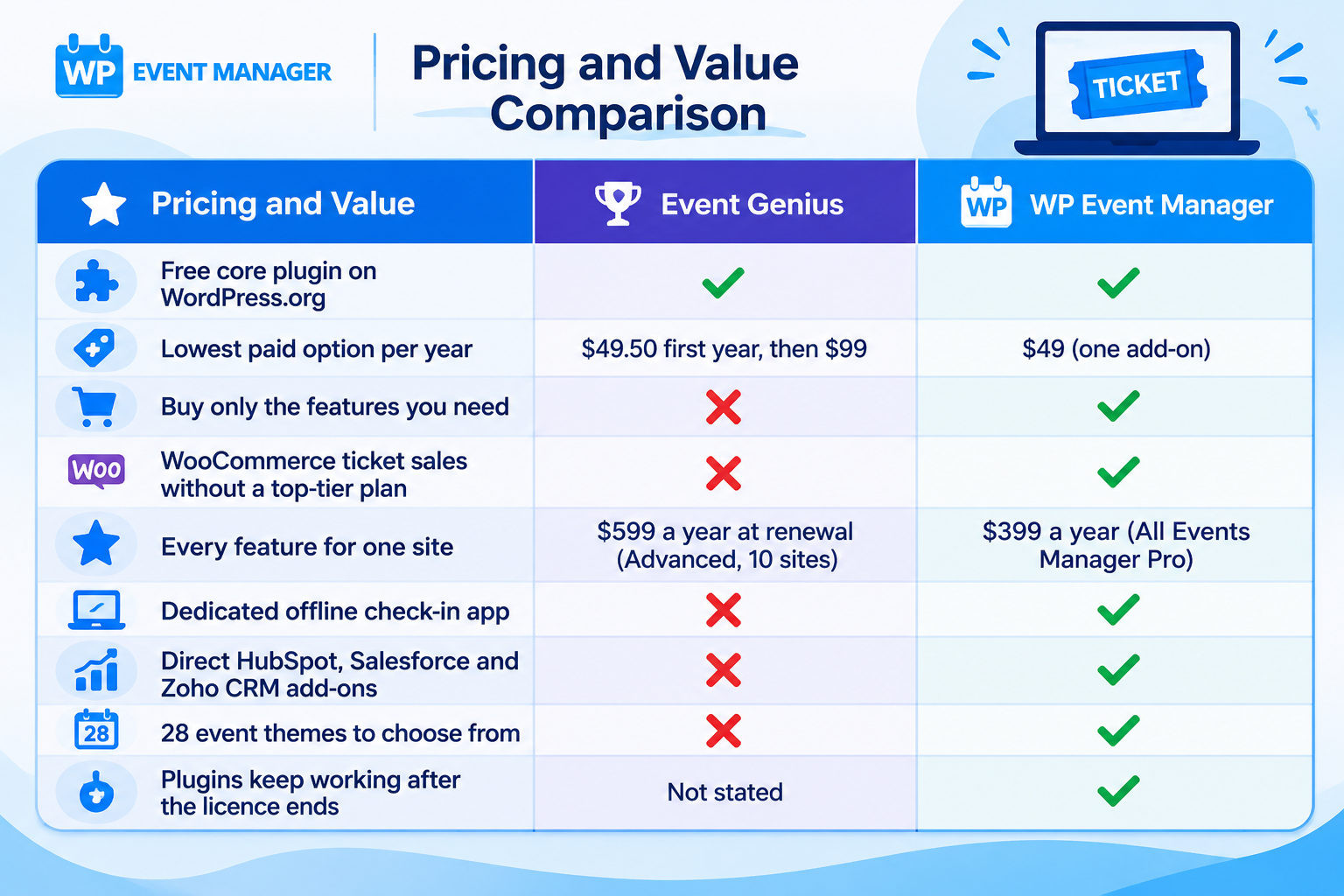
If your WP Event Manager licence runs out, your plugins keep working. You'd only miss updates and support until you renew. And before you spend anything, you can try every add-on on the Live Demo.
Why Choose WP Event Manager Over Event Genius?
WP Event Manager has won several awards, including the SME Business Award 2024, The WP Awards 2023 and a Monster's Award in 2023. It has been downloaded more than a million times, and over 30,000 organisers use it today. On WordPress.org alone, it shows 20,000+ active installations against Event Genius's 600+.
Real sites back that up. Danschool Wesseling, a dance school, uses the Recurring Events add-on and no longer re-enters its weekly classes by hand. Phillip Dane, founder of Vintage Land, has shared how WP Event Manager helped his events business grow.
Here's what you get with WP Event Manager:
- A free core on WordPress.org that grows with you, one add-on at a time.
- 42 add-ons, from Calendar and Sell Tickets to HubSpot CRM and Expo Networking.
- A check-in app for Android and iOS that still works when the Wi-Fi doesn't.
- PDF tickets with QR codes and zero commission on every sale.
- 28 themes made only for event websites.
Wrapping Up: Event Genius or WP Event Manager?
Event Genius is a tidy registration plugin, and its free version is easy to start with. But its paid features sit behind four plans, and the first-year prices double when you renew. If you want to scan QR tickets with a phone app, send attendees to Mailchimp, HubSpot or Salesforce, run a hybrid event with a virtual expo, or use a theme built for events, WP Event Manager is the better choice.
You can install the free plugin from WordPress.org today and try the add-ons on our live demo. Then buy only the ones you'll actually use. Got questions along the way? Our team is on Slack, Facebook, support tickets, and calls.
FAQs
Is WP Event Manager a good alternative to Event Genius?
Yes, and for most organizers, it's the stronger choice. It offers 42 add-ons, its own offline check-in app and direct links to tools like Mailchimp and HubSpot, and you only pay for the add-ons you install.
Does Event Genius or WP Event Manager have a mobile check-in app?
WP Event Manager does, with a dedicated app for Android and iOS that scans QR codes and works offline. Event Genius has no app, so staff check people in by searching names on a screen inside WordPress.
Is WP Event Manager cheaper than Event Genius?
In most cases, yes. A single WP Event Manager add-on is $49 a year and every add-on together is $399, while Event Genius renews at $99 to $599 a year depending on the plan.
Can I sell tickets through WooCommerce with both plugins?
Yes, but Event Genius only includes WooCommerce in its Advanced plan, which renews at $599 a year. With WP Event Manager, the Sell Tickets add-on brings WooCommerce, PDF tickets with QR codes and 100+ payment gateways.
Which plugin is better for virtual and hybrid events?
WP Event Manager offers more, with add-ons for Zoom, Speaker and Schedule, and Expo Networking, plus AI matchmaking in the Registrations add-on. Event Genius lets you add a protected meeting link to an event, but it doesn't list tools for speakers, sessions, or exhibitors.
About the Author