Use coupon code:
 Something exciting is coming soon – stay tuned to find out! 🚀✨

- « Previous blog
-
Case Studies
-
Nov 13, 2026
-
Nov 13, 2026
-
281
-
0
- Next blog »
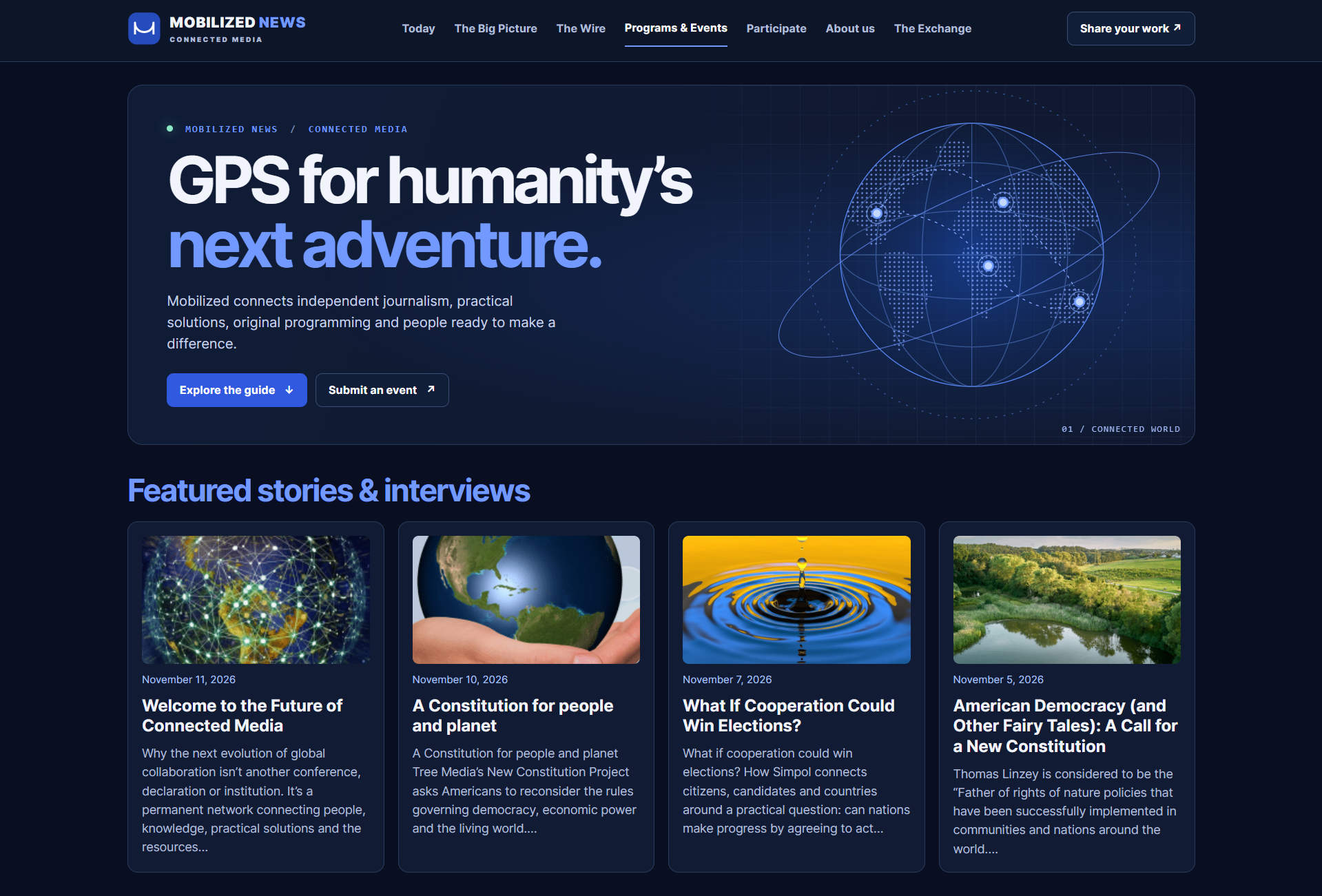

Mobilized News is an international news and media network. It mixes independent journalism with practical solutions, original programs, and events, all aimed at helping people get past misinformation and live together better.
Industry:
Events and Event TicketingWebsite:
https://mobilizednews.com/Purchased Products:
Free Core PluginA big part of the site is its programming guide, a public list of webinars, livestreams, and conferences sent in by partners from many countries. Mr Steven Jay, the Creative Director, runs that guide on the free WP Event Manager plugin.
In this case study, we look at how Mobilized News uses our free WordPress event plugin to take in event submissions, approve them and show them to readers in one searchable list. We also share why Mr Steven picked WP Event Manager after his own research, and what he values most about working with our team.
- Company: Mobilized News
- Industry: News and media, independent journalism, and public programming
- Contact: Mr Steven Jay, Creative Director
- Website: mobilizednews.com
About Mobilized News
Mobilized News describes itself as a connected media network for an interconnected world. Its team wants to help people clear up misunderstandings and misinformation and to push social justice and human rights forward by changing the systems behind them.
The site brings several kinds of content together:
- News and analysis under sections such as Today, The Big Picture, and The Wire.
- Programs and Events, the programming guide where readers find sessions to join.
- The Exchange, a directory where people and groups share their work.
- Ways to take part, from sending in a story to sharing a programme.
The programming guide covers a wide range of topics. Readers can browse events under categories like Climate, Human Rights, Ethical Finance, Public and Planetary Health, and Smarter Cities and Communities. Most sessions are online, but the guide also lists in-person conferences in cities such as Nashville and Paris.
Why Mr Steven Chose WP Event Manager
A programming guide like this one gets events from many partners, in many time zones, on many topics. Mobilized News needed a way for those partners to send in their own events, a check before anything went live, and a list that readers could search without help.
Mr Steven didn't pick the first plugin he found. He searched, studied the options and then chose WP Event Manager for two reasons:
- It was easy to understand, so his team could set it up and run it without a long learning curve.
- Our customer support team was there when he needed help.
It also mattered that WP Event Manager runs on the Mobilized News website itself. The events, the readers, and the traffic stay with the publisher instead of moving to a third-party ticket site.
How the Free WP Event Manager Plugin Powers the Programming Guide
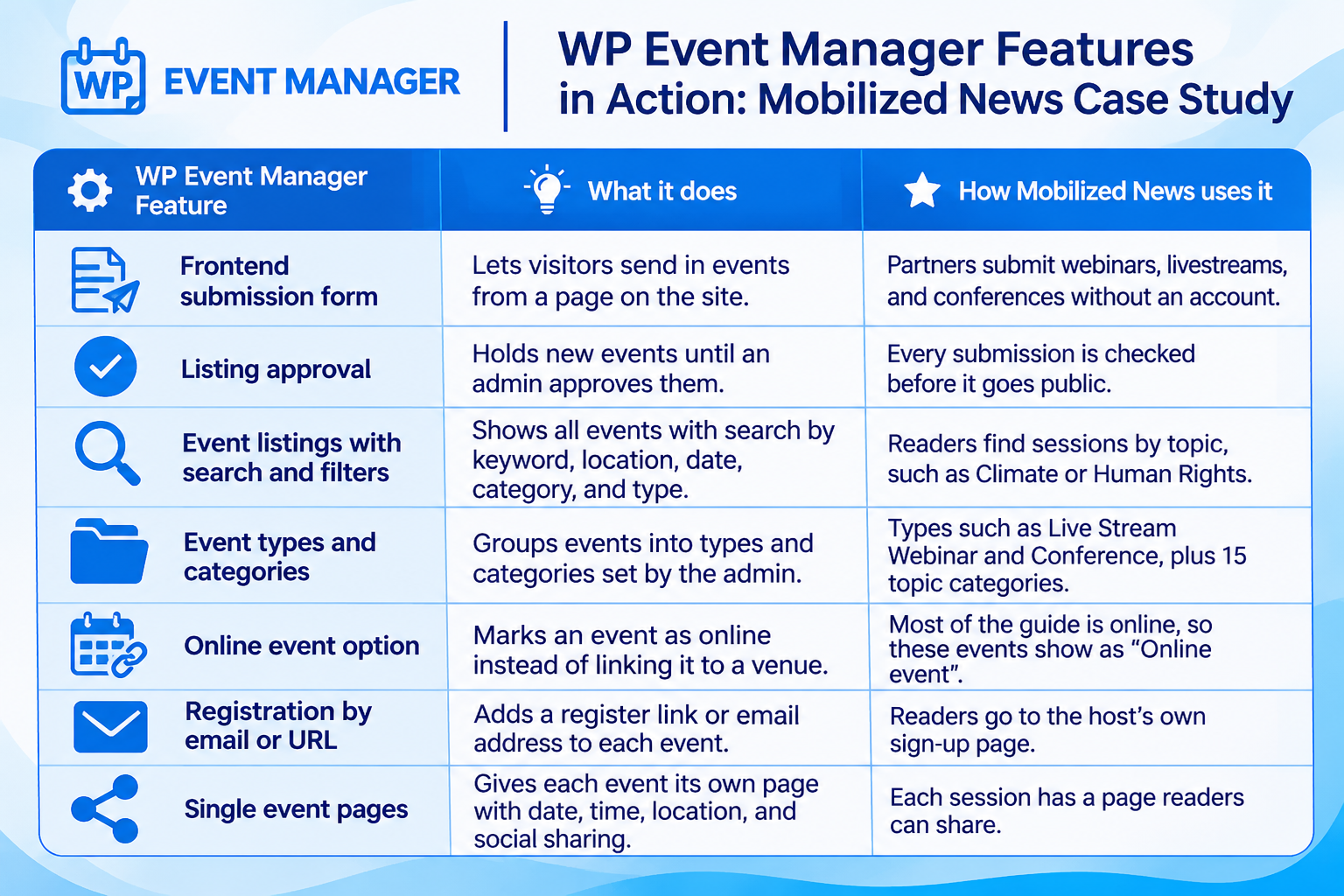
Mobilized News runs its whole programming guide on our free core plugin, with no paid add-ons. Here is what each part does on the site:
A Frontend Event Submission Form With Approval
The submission page is the heart of the guide. Our frontend event submission form lets any partner add an event straight from the Mobilized News site, with no account needed. They add a title, thumbnail, banner, description, dates, time zone, ticket type and a link where people can register.
Nothing goes live on its own. WP Event Manager can hold every new listing until an admin approves it, and Mobilized News uses that to check each event first. For a publisher focused on reliable information, that step keeps the guide trustworthy.
The team has also added fields of its own to the form, such as "What You'll Learn", "Why This Matters" and an Action Level from Discover to Act. These fit the way Mobilized News presents its programmes.
Online Event Listings Readers Can Search
The Programs and Events page shows every approved session in one list. Each entry shows the date, time zone, location, or "Online Event", the event type, and whether it is free or paid. Readers can search by keyword or location, pick a date range, and filter by category and event type.
This is where our online event listings help a global audience. A reader in London and a reader in New York can both find a webinar on farm finance or city planning in a few clicks.
Event Pages Built to Be Shared
Every event gets its own page with a details panel for the date and time, location, type and category. Readers register through the host's link and share the session on social media from the same page. For a network that grows by people passing things on, this is a simple but useful part of the setup.
What Changed for Mobilized News With WP Event Manager
Mr Steven rates his experience with WP Event Manager as wonderful. Today, the programming guide works like this:
- Partners add their own events through one form on the site.
- The team approves each listing before readers see it.
- Readers browse webinars, livestreams, and conferences from many countries in one place.
- The whole guide runs on the free core plugin, with help from our support team when needed.
Mobilized News hasn't shared figures, so we've kept to what Mr Steven has told us and what the live site shows. The guide currently lists upcoming sessions on a wide mix of subjects, from talks on history and social movements to clean energy and transport.
What Other Publishers Can Learn From Mobilized News
- Let partners submit their own events and keep an approval step so quality stays high.
- Sort events into clear topics and types so readers can find what fits them.
- Start with the free plugin and only add paid features once you need them.
- Keep your events on your own website so the readers and traffic stay with you.
Build Your Own Event Guide With WP Event Manager
WP Event Manager works well for news sites, media networks and community groups that want to list events from many sources. The free core plugin already gives you a frontend submission form, listing approval, search and filters, and organiser and venue pages. As an event management plugin for WordPress, it lets you add features later when you need them, one add-on at a time or through a bundle.

About the Author