Use coupon code:
 Something exciting is coming soon – stay tuned to find out! 🚀✨

- « Previous blog
-
Case Studies
-
Nov 12, 2026
-
Nov 12, 2026
-
41
-
0
- Next blog »

Javan.events is an online ticket shop in the events and ticketing industry. Mr William Petersen set it up because he felt organisers and ticket buyers needed a better system than the ones they had. His must-have was a seating chart, so buyers could pick their own seat. He found WP Event Manager through Google, tested it on our live demo and built the shop on our plugin and themes.
Industry:
Events and Event TicketingJavan.events is an online ticket shop in the events and ticketing industry. Mr William Petersen set it up because he felt organisers and ticket buyers needed a better system than the ones they had. His must-have was a seating chart, so buyers could pick their own seat. He found WP Event Manager through Google, tested it on our live demo and built the shop on our plugin and themes.
In this case study, we look at why a ticket shop needs a proper WordPress seating chart plugin, how WP Event Manager handles seated ticket sales and check-in, and what Mr William liked most about working with us.
Company: Javan.events
Industry: Events and ticketing, online ticket shop
Contact: Mr William Petersen
Website: javan.events
Why Javan.events Needed a Seating Chart Plugin
A ticket shop that sells seats for shows, concerts, or seated venues can't work with general admission tickets alone. Mr William put it simply: they really needed a seats chart. Without one, the shop had these problems:
- Buyers couldn't see the venue layout or choose where they'd sit.
- Every seat had to sell at one price, with no easy way to charge more for the front rows or VIP areas.
- Two people could end up paying for the same seat.
- Organisers had to track seat numbers by hand after each sale.
Mr William wanted a better system, one that would handle seats, sales, and the event day without stitching together separate tools.
Why Mr William Chose WP Event Manager
Mr William found us on Google. He then tested WP Event Manager on our demo site before he chose it. The demo has real event pages, listings, and calendar views, so he could see what his ticket shop would look like.
Here is why it worked for a ticket shop:
- The free plugin has event listings, search, organiser and venue pages, and a form to add events from the front end.
- Extra features like seating charts and check-in are separate add-ons. The shop pays for the ones it uses and nothing more.
- Ready-made WP Event Manager themes give the shop a full events design from day one.
- Everything runs on the shop's own WordPress site, so the customers and the ticket data stay with Javan.events.
How WP Event Manager Powers Javan.events
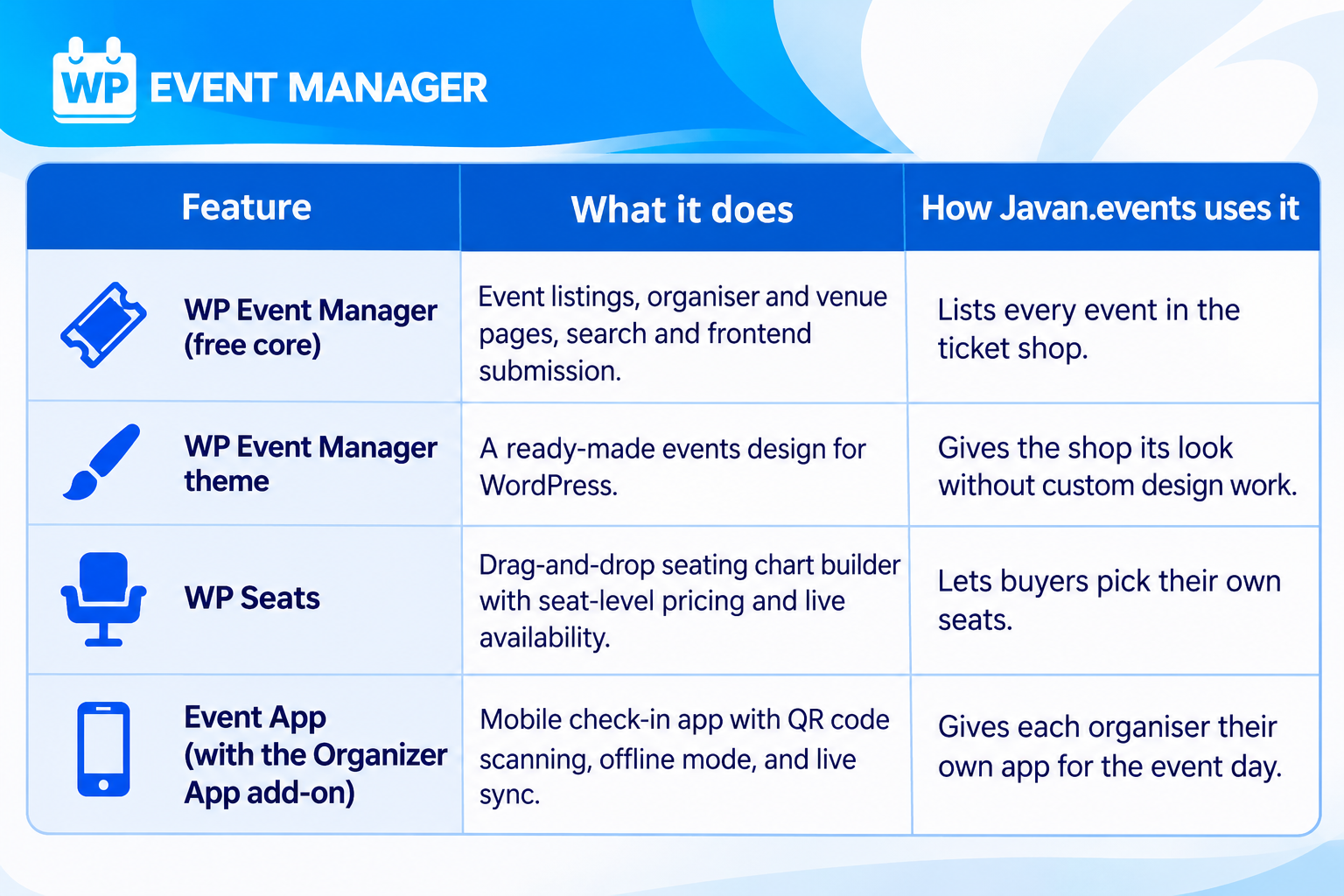
Mr William told us the shop runs on WP Event Manager and our themes, and that the mobile app helped most. Here is what each part does:
WP Seats Puts the Seating Chart on the Event Page
WP Seats was built for the exact problem Mr William had. The organiser builds a map of the venue by dragging rows and seats into place. Buyers then see that map on the event page itself.
As a WordPress seating chart plugin, it covers:
- Simple charts, sections and floors, or zones, to match the venue.
- Different prices for single seats or whole zones, with ticket types such as VIP, Gold, and Silver.
- Colour-coded seats, so buyers can see what's available, booked, or reserved.
- Live availability, with seats locked after booking so nobody pays for the same seat twice.
- Zoom, pan, and full-screen views that work on phones.
- Confirmation emails that show the seat number.
Checkout runs through WooCommerce, so the shop can sell event tickets on WordPress with the payment gateways it already knows.
The Event App Gives Every Organiser Their Own Check-In
This was Mr William's favourite part. He told us it was a great point that WP Event Manager has a mobile app for each organiser. Each organiser logs in with their own account and checks in guests from a phone or tablet.
Our Event Check-in app lets organisers:
- Scan the QR code on each ticket, or check guests in with a swipe.
- Search the attendee list by name.
- Keep working without the Internet, with data syncing back once the connection returns.
- See check-ins from several devices in real time.
- Add the shop's own branding.
The app works with the Organizer App add-on.
WP Event Manager Themes Give the Shop Its Design
Javan.events also uses our WordPress event themes. WP Event Manager has 28 themes built for event sites, and each one comes ready for listings, single event pages and organiser profiles. A shop can start selling with a finished design instead of building pages from scratch.
What Mr William Values Most About WP Event Manager
Mr William hasn't shared sales figures, so we've kept to what he told us himself:
- The shop now has the seating chart it was missing.
- Each organiser has their own mobile app for check-in.
- Our support team gave him good service along the way.
What Other Ticket Shops Can Learn From Javan.events
- Make a list of must-have features first. For Javan.events, it was the seating chart.
- Test the plugin on a live demo before you build, so there are no surprises later.
- Think about the event day as well as the sale. Fast check-in at the door matters to organisers.
- Choose an event management plugin for WordPress that lets you add features as the shop grows.
Sell Your Own Event Tickets With WP Event Manager
WP Event Manager suits ticket shops, venues and event organisers of any size. You can begin with the free core plugin. It already has listings, frontend submission, organiser and venue pages, and search. Add seating charts, ticket sales, and the check-in app when you need them, or get a bundle for several add-ons at once.
About the Author