Use coupon code:
 Something exciting is coming soon – stay tuned to find out! 🚀✨

-
Case Studies
-
Nov 3, 2026
-
Nov 3, 2026
-
40
-
0
- Next blog »


Scottsdale Living is a community network for residents and small businesses in Scottsdale, Arizona. Founder John Doering wanted one place where people could see every event happening in the city, so the team chose WP Event Manager as the base for its community events calendar on the advice of their web designer.
In this case study, we look at what Scottsdale Living set out to build, why the team went with WP Event Manager, and which parts of the plugin John's team leans on most while they prepare thousands of articles, publications and events for launch.
Company: Scottsdale Living, Scottsdale, Arizona, USA
Industry: Local community network and information resource
Contact: John Doering, Founder
Website: thescottsdaleliving.com
About Scottsdale Living
Scottsdale Living is a community-based project that is founded on the values of Scottsdale and the people who live and work there. Mr. John describes it as a community network. The idea is to provide residents and small businesses with a resource they can rely on for what's going on around them.
Alongside the website, the project already has an active Facebook group where locals connect and share news.
The website is the bigger piece of work. Mr. John's team is putting together a large library of local publications, articles, and events, so that a resident, a visitor, or a shop owner can find useful information about the city in one spot.
Why Scottsdale Living Needed a Single Source for Local Events
In most towns, event details are spread across many places, and residents miss things because nobody gathers them together. In Scottsdale, as in many cities, they were coming from:
- Social media posts from markets, venues, and clubs
- Newsletters sent by galleries and local groups
- Flyers in shop windows and community boards
- Sign-up pages for charity runs and small business events that few people ever see
Mr. John wanted to fix that with a single source showing every event in the community. Blog posts couldn't hold that kind of detail. Each event needed its own date, venue, organizer and category, saved in a way the site could search.
Mr. John's team has a long list of events to put up before the site opens, and plenty more will come in once it's live, so posting each one couldn't turn into a long job. Visitors also needed search and sorting to reach the right event fast, and since the listings would sit next to articles and publications, they had to look good on the page too.
Why Scottsdale Living Chose WP Event Manager
Scottsdale Living's web designer recommended WP Event Manager for the build. Once the team started working with it, Mr. John found that it covered what a busy local events website needs.
He named four things that helped most:
- Usability: Settings and events are managed from the WordPress dashboard they are familiar with.
- Easy event creation: The team can add an event in the WordPress admin, or let organizers send one in through the form on the site. Either way, there's a preview to check before it's published.
- Sorting: Visitors can look for an event by name or keyword, pick a location or a date, and narrow things down by category or event type.
- Visual presentation: Events can be shown in box or list view, on a calendar, with colour-coded categories and in sliders.
How WP Event Manager Powers Scottsdale Living's Events Section
Scottsdale Living runs the free core plugin together with our premium addons. The sections below cover the parts that match what Mr. John values most: quick event entry, sorting, and a strong visual layout.
The Core Plugin Makes Adding Events Simple
As a WordPress event listing plugin, the free core gives the team everything needed to get events onto the site without extra setup.
- Events can be added from the WordPress admin or via a frontend submission form so local organizers can add their own listings.
- There's a preview step so the person can review the listing before it goes live.
- If the submission form is missing a field or has one the team doesn't need, the field editor sorts it out. Fields can be added, changed, or taken out without code.
- Organizers don't lose access once an event is posted. From their dashboard on the site, they can go back and change the event details, their organizer profile, or the venue info.
The entry process has to be quick with a project this size. That is why Mr. John lists ease of use and easy event entry as the features that helped most.
Event Filters Help Visitors Sort Through Every Local Event
A site that aims to show everything happening in a city needs strong event filters, or visitors give up scrolling. The core plugin lets people:
- Search the listings by keyword or event name
- Narrow results down to a location
- Filter by category and event type
- Select a date range, such as this weekend or next month
If you're looking for something fun for the family on Saturday, you can get there in a few clicks without having to scroll past every concert and business meetup.
Calendar Gives the Community a Month-by-Month View
The Calendar add-on turns it into a community events calendar that residents can scan at a glance.
- Events are shown in a monthly or yearly calendar view.
- Hover over an event to see a pop-up with the event's name, date and time, and banner image.
- A shortcode builds a full calendar page of upcoming and past events.
- A compact calendar widget can sit in the sidebar of article pages.
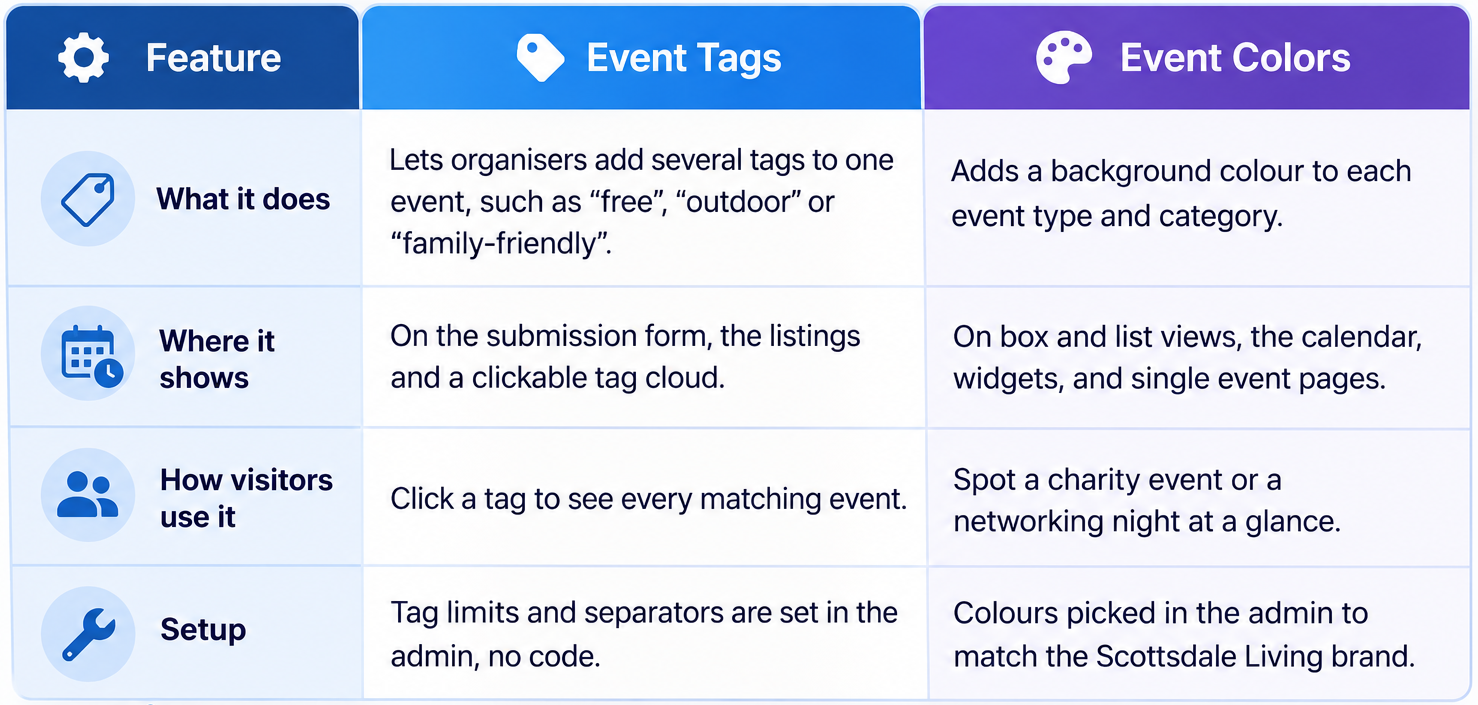
Event Tags and Event Colors Make Listings Easier to Read
Categories cover the broad groups, but a community site with hundreds of listings needs more ways to tell events apart. These two add-ons work together for that:
Sliders Put Featured Events Front and Centre
Visual presentation was one of the reasons John gave for liking WP Event Manager, and the Sliders add-on is built for it. A shortcode places an event slider on any page, such as the homepage or the top of an article.
- Each slide shows the event image, title, organiser name, description, and time.
- Slides also say whether an event is free or paid.
- The team can choose which events to feature and in what order.
- Height, autoplay, and slide speed can all be adjusted.
- Sliders resize for phones, tablets, and desktops.
What Other Community Sites Can Learn From Scottsdale Living
- Decide early what the site's main job is. For Scottsdale Living, it was showing every local event in one place, and every choice after that followed from it.
- Ask the people building your site for a recommendation. A web designer who has worked with a plugin before can save you weeks of testing.
- Events are structured data from day one, so sorting and filtering is possible when the listings get into the hundreds.
- Pay attention to how listings look because colour, images, and sliders make a long events page much easier to browse.
Scottsdale Living's Suggestion for WP Event Manager
We always ask our customers where we could do better. John didn't raise any changes and simply asked us to keep up the work we're doing. We're grateful for the kind words, and we'll keep improving the plugin for community projects like his.
Build Your Own Community Events Calendar With WP Event Manager
City guides, neighbourhood networks and local business groups can all run their event listings on WP Event Manager. The core is a free event management plugin for WordPress, and it already covers listings, organisers, venues and search. When the site needs more, you can pick from our WordPress event plugin add-ons one at a time or get several together in a bundle.
About the Author