Use coupon code:
  Something exciting is coming soon – stay tuned to find out! 🚀✨
- « Previous blog
-
Events
-
Aug 22, 2026
-
Aug 25, 2026
-
9425
-
0
- Next blog »
Selling event tickets online is a part of modern event management that not only accelerates ticket sales but also simplifies the entire process. For creating successful events, with great event content, and an effective marketing strategy you need to have a convenient way of event registration and ticket selling as well.
There are mainly two ways to sell tickets online for events: one is to rely on third-party platforms like Eventbrite and the other is to sell event tickets directly from your website. However, the second option is more beneficial and convenient for every event manager.

WordPress is one of the best platforms that event planners prefer when it comes to their event websites, as It is user-friendly, customizable and it comes with an endless number of event ticketing plugins for feature enhancement.
So how to sell tickets on WordPress for events?
Read this article thoroughly to get the answer.
Things You Need to Sell Tickets on Your WordPress
To sell tickets on your WordPress site, you need dedicated plugins to support the entire process, starting from displaying tickets to accepting payments. Considering the fact that you already have a website, here are the things you need to sell your event tickets on your website:
- Event management plugin: No matter what type of events organize, you must have an event management plugin like WP Event Manager to clearly display your events on your website and create dedicated event pages.
- Ticket selling plugin: A ticket selling plugin allows you to create different ticket types, set prices, define ticket limits, and manage sales on your website systematically.
- Secure payment gateway: To sell paid event tickets you must have a secure payment gateway to ensure that your attendees confidential information remains in the safe hands.
- Smooth registration system: A registration solution enables you to create the registration form by filling up which a person will be able to register.
- Easy check-in facility: A QR-code or ticket scanning system can help you verify tickets and speed up entry at the event.
- Digital ticketing: Give attendees a convenient way to access their tickets, such as downloadable or email-delivered tickets with QR codes.
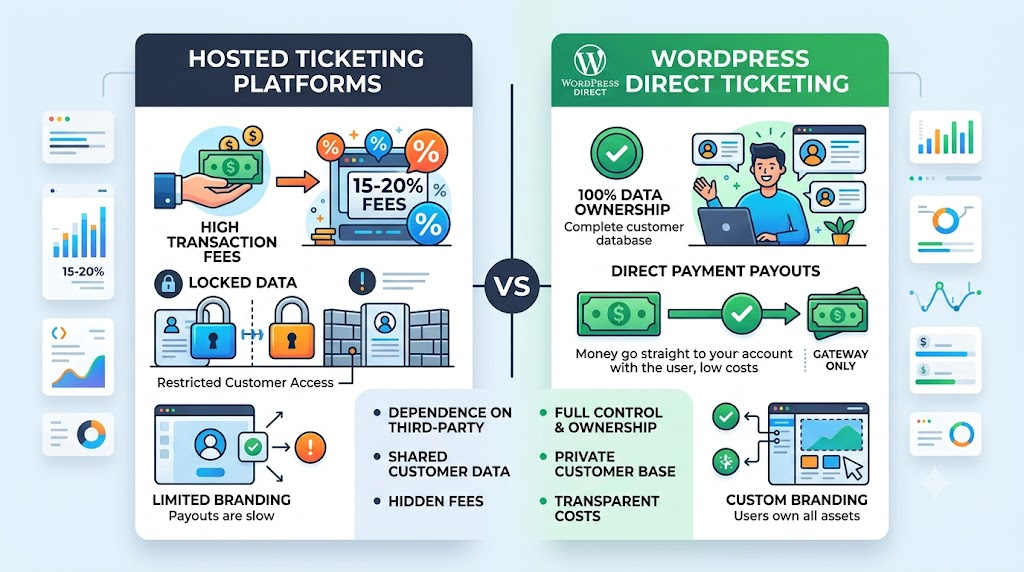
Hosted Ticketing Platform vs. WordPress Ticketing
How Much Can Ticketing Fees Cost?
Ticketing fee usually depends on various factors like the platform you are using, ticket price, size of your event and most importantly, the payment system. Hosted ticketing platforms may charge a certain percentage on each ticket sold, a fixed fee per ticket, payment processing fees, or a combination of these charges.
Consider the following things:
- Per-ticket fees: A fixed amount may be charged ticket sold.
- Percentage-based fees: A fixed percentage of the ticket price is charged.
- Payment processing fees: Additional charges may apply for processing online payments.
- Refund or cancellation fees: Some ticketing platforms may also charge fees when tickets are cancelled or refunded.
Why sell event tickets directly from your WordPress site?
Selling event tickets online directly from your website helps you:
- Boost your event ticket revenue.
- Improve user experience with a convenient ticketing system.
- Manage attendees, registrations and ticket sales all at one place.
- Keep audiences glued to your site.
- Track ticket sales and measure success with useful insights and analytics.
How to Build a Better Ticket-Buying Journey
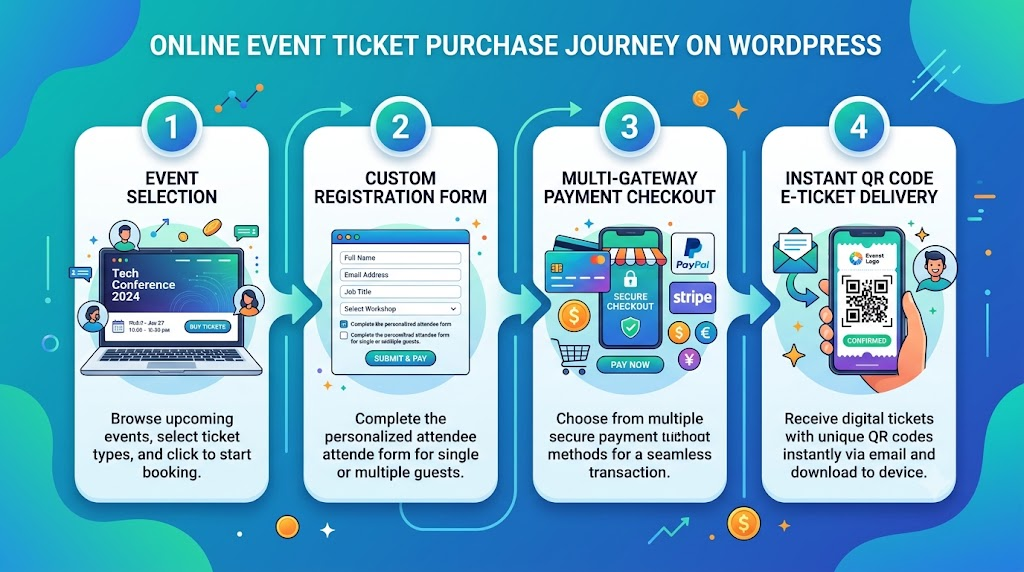
To sell event tickets on WordPress, you need to use a feature-rich WordPress ticketing plugin like WP Event Manager’s Sell Tickets addon. In this article, we will explain how you can sell event tickets on WordPress with the Sell Tickets addon.
Here are the steps you need to take to sell your event tickets through your WordPress events website.
1. Install the Sell Tickets addon from WP Event Manager
There are multiple WordPress ticket-selling plugins available on the WordPress repository to choose from. However, we recommend WP Event Manager’s Sell ticket addon because of the following reasons:
- Robust features.
- Friendly support.
- Affordable.
- Thousands of positive customer reviews.
- WooCommerce-based payment facility.
Now that you know why you must use WP Event Manager for your ticketing system, let us explore the key features of the Sell Tickets addon.
- Multiple ticket types.
- Registration dashboard.
- Digital tickets.
- Track attendee check-ins with QR.
- Customizable ticket templates.
- Mobile ticketing app.
- WooCommerce ticket management.
- Ticket insights and more.
To install the Sell Tickets addon. You need to keep the following things in mind:
- At first, you need to install the core plugin that is WP Event Manager.
- Then the Sell tickets addons can be installed.
- Secondly, you also need to install the registration addon to use the Sell tickets addon.
Here are the steps to install WP Event Manager:
- Go to wp-admin.
- Click on Plugins >> Add new, in the sidebar on the left.
- In the Keyword Search Bar type WP Event Manager. A list of plugins would appear.
- Select WP Event Manager.
- Click on the Install Now and Activate options,
- Then you will be redirected to WP Event Manager Setup Wizard where you can set up pages for your website.
- Then click on the Continue to page setup option.
- Then select the pages, you want to display on your website and click on Create selected pages.


Then WP Event Manager will create pages using shortcodes.
Once you install the core plugin, follow the below-mentioned steps to add the sell tickets addon:
- Click on the download link using the email id that you have used to buy the plugin and save the addon zip file on your computer.
- Login to WordPress admin panel (e.g. www.yourdomain.com/wp-admin).
- Click on the “Plugins” and then click “Add New”.
- Click the Upload link near the top, then “Choose File”.
- Select the downloaded add-on zip file.
- Press the “Install Now” link.
- After the installation, click “Activate Plugin”.
- Repeat the above steps for any additional premium add-ons you have purchased and downloaded.


Activate your Plugin using your License key and registered email id.
To get the detailed installation guide, click here.
Once you are done with the addon installation you are ready to work with it.
2. Selecting Ticket Types
After activating the plugin on your site, you can make changes to the settings as per your requirements.
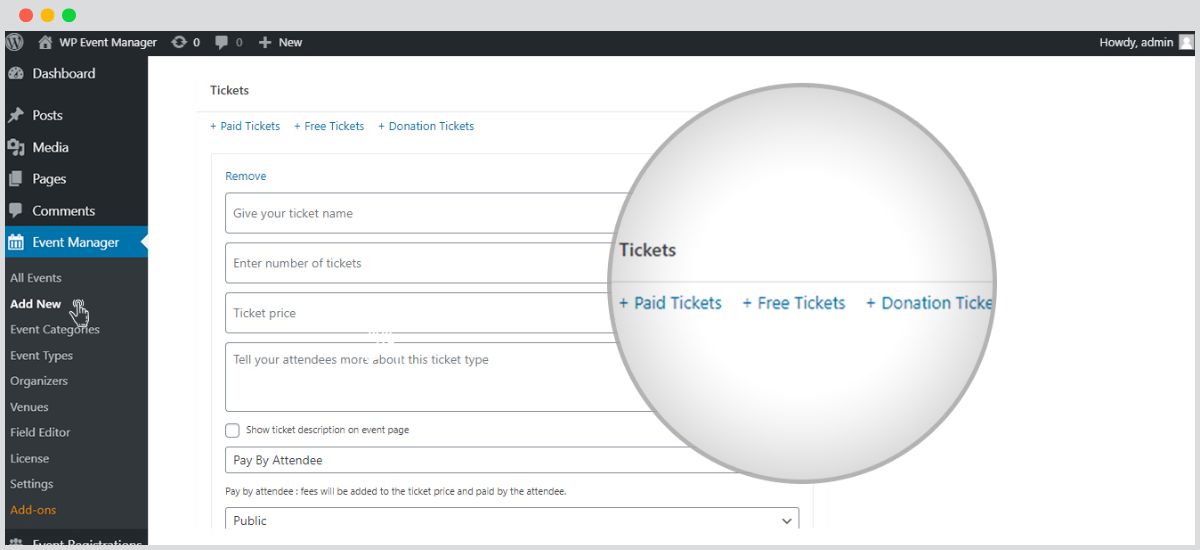
Step 1: You need select the ticket type that you want to display for a specific event as the Sell Tickets addon allows you to sell three different types of tickets including:
- Paid.
- Free.
- Donation.
Follow the below mentioned your preferred types of tickets.

Go to WP-admin >> Event Manager >> Settings >> Sell Tickets.
3. Configure your Settings
After choosing your preferred tickets, customize your tickets through the Settings section.
There is a Settings tab, located beside the Ticket Details option on the front end event submission form. From here you can make your preferred changes to the ticket settings before submitting the tickets on your site.
4. Adding a new ticket
To add a new ticket to your event here are the steps you need to take:
Go to WP-admin >> Event Listing >> Add New >> Tickets.
You can also add new tickets from the WooCommerce page. You can get all the details of selling tickets with Sell tickets in its knowledgebase section.
Sell your event tickets with WP Event Manager
Besides the Sell Tickets plugin, WP Event Manager offers a lot of other add-ons that can simplify your ticketing system. Check out the other ticket-selling add-ons that you can consider to build a powerful ticketing system on your WordPress site.
Who Should Consider WordPress Ticketing?

WordPress ticketing can be a good option for organizers who want more control over their event website, ticket sales, and attendee data. It can be particularly useful for:
- Event organizers who want to sell tickets directly from their event website without sending attendees to a separate ticketing platform.
- Businesses and brands to Keep event registration and ticket sales aligned with their existing website.
- Conference and exhibition organizers to manage different ticket types, registration details, and attendee information from one place.
- Educational institutions to handle registrations seamlessly and paid events such as workshops, seminars, conferences, and campus events.
- Communities to Sell membership-based or event tickets while keeping attendee information within their reach.
- Recurring event organizers – Reuse their WordPress ticketing setup for multiple events instead of starting from scratch each time.
Frequently Asked Questions
1. Can I sell event tickets through WordPress?
Yes You can sell event tickets using WordPress plugins like Sell Tickets from WP Event Manager.
2. How do I accept payments for WordPress events?
To accept payments for events on WordPress, you need an event ticketing or registration solution connected to a payment gateway.
3. Can I keep my event website and branding?
Yes, if you use the Sell Tickets addon from WP Event Manager you can easily set your ticketing system on your existing WordPress site and add you brand color, logo and font style to keep your brand identity intact.
4. Can WordPress manage attendee information?
Yes, Yes. WordPress can manage attendee information when you use an event registration or ticketing plugin. You can create a custom event registration form to collect your preferred data from attendees.
5. What should I consider about ticketing fees?
Check platform fees, payment processing charges, transaction fees, and additional feature costs to understand the total cost of selling each ticket.
6. Is WordPress ticketing suitable for conferences?
Yes, WordPress ticketing solution is suitable for all types of events including conferences.
About the Author