Use coupon code:
 Something exciting is coming soon – stay tuned to find out! 🚀✨

-
Case Studies
-
Nov 4, 2026
-
Nov 4, 2026
-
50
-
0
- Next blog »

JemezVillage.com is a website for people living in and visiting the Jemez Mountains, up in north-central New Mexico. Owner Damien Spencer built it so artists, growers and local service providers could reach customers while staying rooted in their own rural community.
To give local groups a way to promote what they're running, he added WP Event Manager and turned the site into a local events website where people post their own listings and he decides what gets published.
In this case study, we look at why JemezVillage.com needed an events tool, how frontend event submission and admin approval keep the calendar both open and clean, and how the team is handling weekly classes with our Recurring Events add-on.
Company: JemezVillage.com, Jemez Mountains, New Mexico, USA
Industry: Local community, business and tourism website
Contact: Mr. Damien Spencer, Owner
Website: jemezvillage.com
About JemezVillage.com
Jemez Springs, Jemez Pueblo, San Ysidro, Cuba and La Cueva are some of the places it covers. Damien thinks shopping local helps in a few ways. Money stays nearby, there's less pollution from shipping goods long distances, and people in the community grow closer. Local sellers get to reach buyers from further away, but the site is still built around the people living close by.
Alongside events, the site brings together:
- A directory of local businesses, nonprofits, utilities and public offices
- A marketplace for local products, crafts, and seasonal goods
- Community news, with a form for locals to send in their own stories
- A neighbourhood guide and emergency contacts for residents and visitors
Why JemezVillage.com Needed a Community Events Tool
A lot happens in the Jemez area. In a typical month, the calendar can hold a tai chi session in the community park, a language class run by the Pueblo of Jemez, a book chat at the public library, fitness classes at the senior centre and a flea market in San Ysidro. Each of these is run by a different group, and Damien saw a chance to give them all one place to promote their events.
Damien wanted JemezVillage.com to be the most reliable and current place to find out what's on locally. For that, the events section had to:
- Let organizers post their own events, so he wouldn't have to type every listing himself
- Give him the final say on what appears because an open form on a public site attracts spam
- Cope with classes and meetups that repeat every week
- Keep the calendar up to date without constant manual clean-up
Why Damien Chose WP Event Manager
Damien tried a couple of other event plugins before settling on WP Event Manager. What made the difference was room to grow. JemezVillage.com started with community listings, but Damien sees it becoming a much bigger platform, and he wanted an event management plugin for WordPress that could grow with it.
That fits how WP Event Manager is built:
- Even without add-ons, you get event listings, organizer and venue pages, search, and a form for people to send in events
- There are over 40 premium WordPress event plugin add-ons too, and you buy only the ones the site actually needs
- These cover things like calendars, maps, ticketing, registrations, virtual events, and links to email and CRM tools
- Everything runs on Damien's own WordPress site, so the listings, the visitors and the data stay with JemezVillage.com
Right now Damien runs the free core plugin and a single add-on, Recurring Events. He may want ticket sales, registrations or venue maps down the line. Each of those is an add-on he can turn on, and the site stays on the same setup.
How WP Event Manager Runs JemezVillage.com's Events Section
We asked Damien which features helped him most, and he gave us two. First, people in the area can add events from the front end of the site. Second, he decides which ones get published, so spam doesn't end up on the calendar.
Frontend Event Submission Lets Locals Post Their Own Events
With frontend event submission, an organizer doesn't need access to the WordPress admin. There's a form on the JemezVillage.com events page. Organizers fill it in and hit submit, and Damien gets it to look over.
- The form asks for the basics, like the title, date and time, venue, and organizer, plus a short description and a banner image
- First-time organizers don't need to sign up separately since typing an email address on the form sets up their account
- After that, they've got a dashboard on the site where they can go back and update an event, their profile, or the venue
This saves Damien from typing up every class and market himself. The groups running the events keep their own listings current.
Admin Approval Keeps Spam Off the Community Events Calendar
An open form on a public site is a target for spam, and Damien didn't want junk listings next to real community events. The core plugin settings give him control over that, with no extra code:
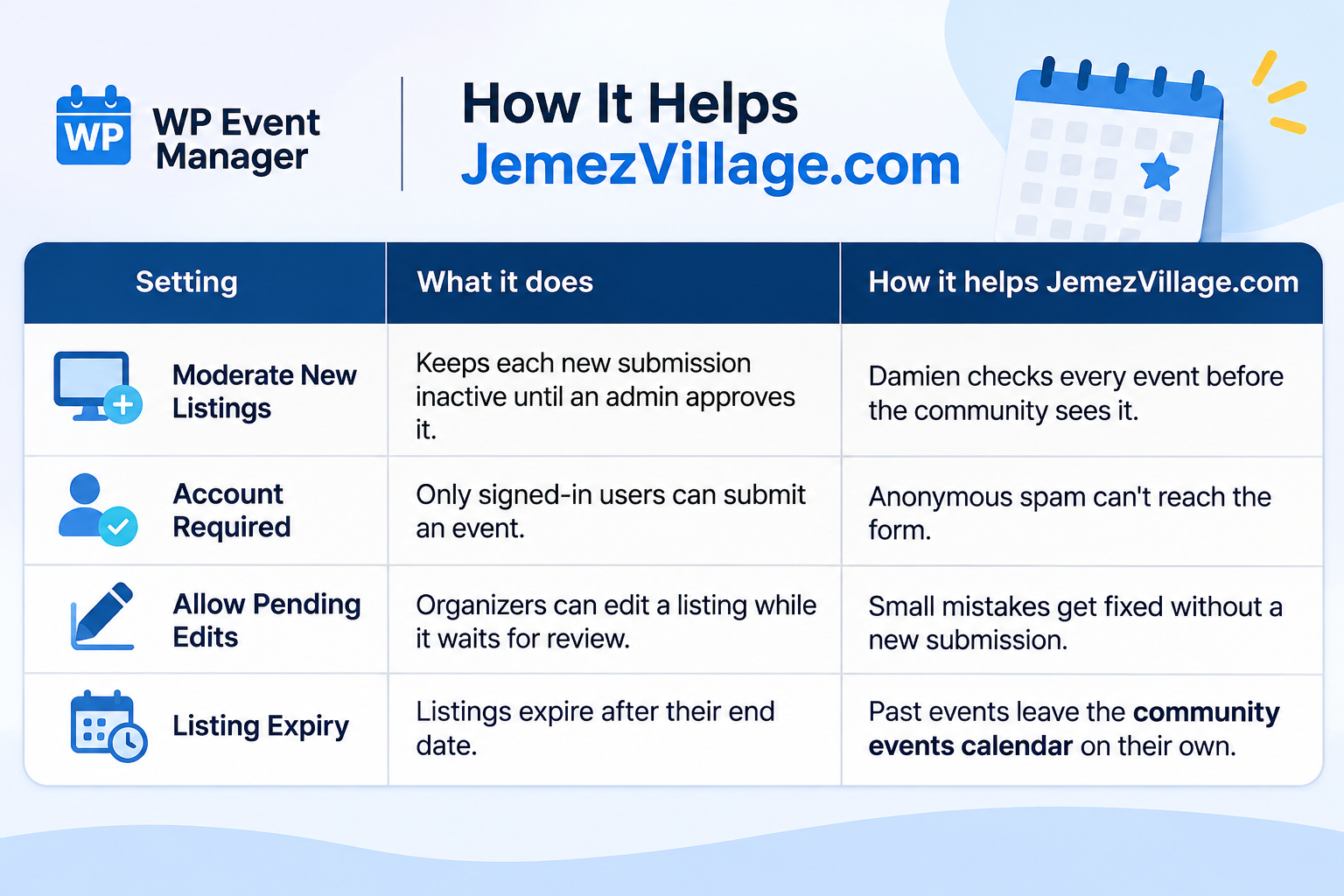
If spam ever gets past this, our Google reCAPTCHA add-on can be switched on for the submission form as an extra layer.
Recurring Events Handles Weekly Classes and Meetups
Many Jemez events repeat. The language class runs on Thursdays, fitness sessions run on Fridays, and talks at the library come round every week. For these, Damien picked our Recurring Events add-on. It's a recurring events plugin for WordPress, so nobody has to post the same Thursday class four times a month.
- The repeat options are daily, weekly, monthly, and yearly
- Organizers add the event once, and the add-on creates the later dates for them
- If one session moves, that date can be edited, and the others stay as they are
Each date gets saved as a separate event listing. That's why one session can be changed without the rest of the series changing too. On a busy community site with many weekly events, that also means a lot of entries to manage. Damien has run into a few problems while setting up his series, including dates that didn't appear straight after creation and extra copies he had to delete by hand. His detailed feedback is with our team, and it's helping us look at how recurring events can be managed more smoothly on larger sites like his.
What JemezVillage.com Expects as Its Events Section Grows
The events section is still settling in, so there are no figures to share yet. What Damien can already say is that the main thing he wanted is working. Local groups post their own events from the front of the site, and nothing goes live until he approves it.
Looking ahead, Damien is aiming for:
- More of the area's clubs, classes and markets using the site to promote their events
- Being the place locals trust most for current event info in the Jemez area
- Less hands-on clean-up for weekly classes once the recurring setup is sorted out
- A bigger platform over time, with more WP Event Manager add-ons switched on as new needs come up
We'll share an update once the events section has been running for a while.
What Other Community Sites Can Learn From JemezVillage.com
- Let the people who run events post them, and keep approval in your own hands so the calendar stays trustworthy
- Test a few plugins before you commit, and look at where each one can take you in two or three years, not only what it does today
- Plan for repeating events early since weekly classes quickly make up a large share of a small town's calendar
- Keep events next to the rest of your local content, such as the business directory and news, so visitors find more than one reason to come back
Build Your Own Local Events Website With WP Event Manager
WP Event Manager works for all kinds of local sites, from tourism guides to small business networks. You can start with the free core plugin, which already has frontend submission, admin approval, organizer and venue pages, and search. Add-ons can be bought one by one later, or you can get a bundle if you need several.
About the Author