Use coupon code:
  Something exciting is coming soon – stay tuned to find out! 🚀✨
- « Previous blog
-
Grow My Business
-
May 7, 2026
-
May 25, 2026
-
2479
-
0
- Next blog »
Many WordPress site owners do not realize that their website is probably slower than it should be and it is costing them more than they think. Though 43.4% of all websites globally are built on WordPress, average sites still load in 2.5 seconds on desktop and a painful 8.6 seconds on mobile, which is certainly not competitive enough in 2026 to rank.
Mobile users abandon a site instantly when it takes more than 3 seconds to load which ultimately reduces conversion. Slow loading sites not only turn off visitors but also affect revenue, user experience, increase bounce rate, and slide down Google ranks.
The good news here is that there is no rocket science behind speeding up your WordPress site. You do not need to put up with the hassle of rebuilding your website from scratch or be a developer. With the right strategies and fixes, your WordPress site can achieve under 2 second load times and also pass Google's Core Web Vitals test.
All you need to do is follow the tips mentioned in this article.
Why WordPress Speed Matters in 2026
In 2026, website speed is much more than just a technical metric as it directly impacts your business outcomes. No matter what type of website you run, its speed determines whether your visitors stay or leave, and whether Google ranks you or buries you.
- Visitors lose interest in a website when its loading speed is slow indicating poor user experience.
- Research shows that even a second delay in page delay significantly reduces conversions which directly hit your revenue.
- Users consider slow loading sites as less trustworthy and less credible. This means your website speed determines your brand reputation as well.
- Website speed is also an important factor in Google's Core Web Vital.
- Having a fast loading website gives you a competitive edge as most websites do not pass all three Core Web Vitals threshold.
- A fast, technically sound page is increasingly a prerequisite for appearing in Google AI Overviews, the new search feature driving significant organic traffic in 2026.
- Consumers' purchasing decisions are also influenced by your website speed.
Now that you know the importance of speeding up your WordPress site in 2026, let us discover the strategies to speed up your site.
How to speed up your WordPress site in 2026: Tips and strategies
Find out useful tips and strategies to increase the speed of your WordPress site and improve its overall performance.
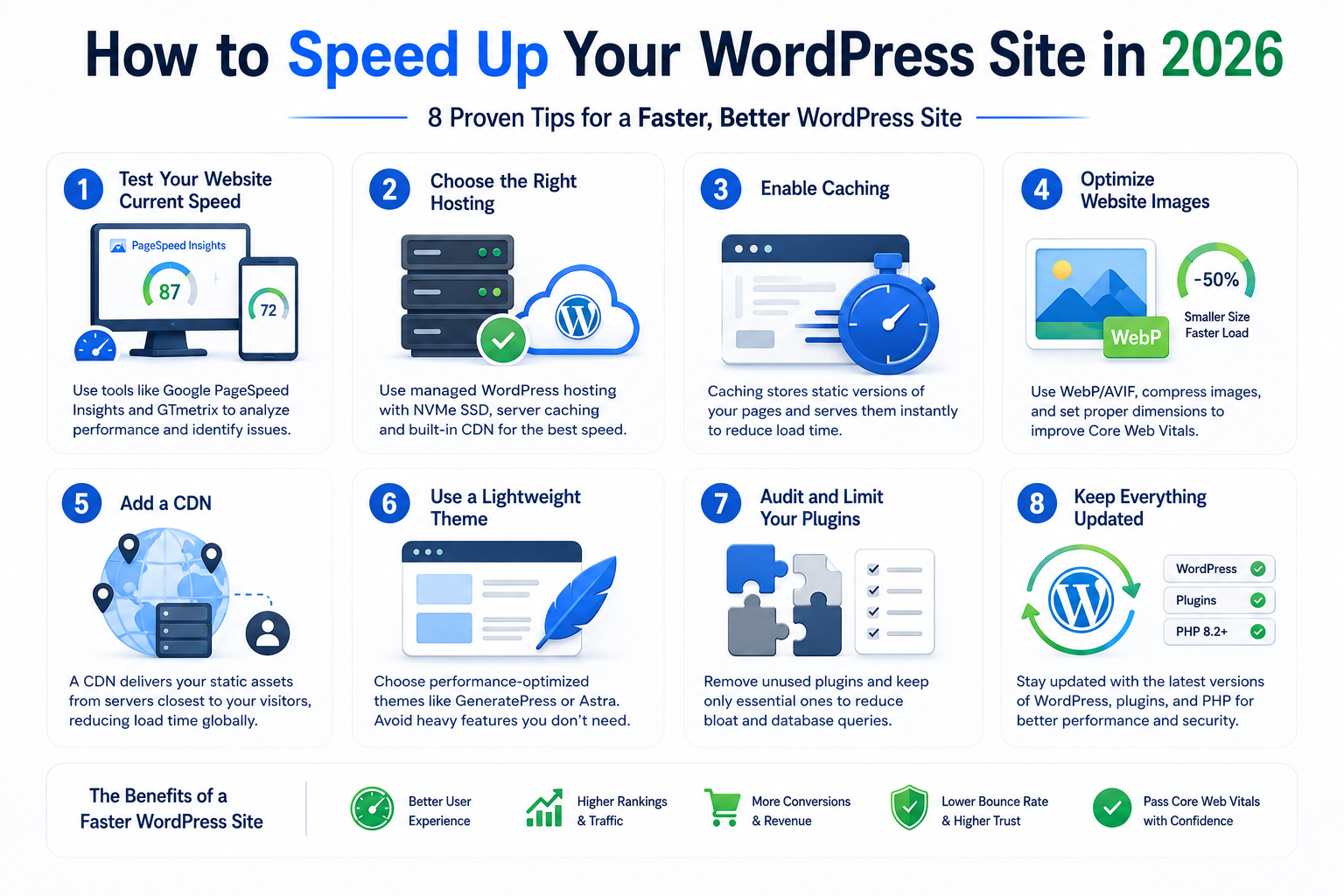
1. Test your website current speed
Before diving into the fixes, it is crucial for you to know where you stand. You need to run a test to find out your current site speed and performance. You can use different tools to initiate the test.
Use Google PageSpeed Insights to examine your website speed. It displays your score out of 100 for both desktop and mobile, identifies specific issues affecting its performance, and shows your Core Web Vitals Data. It is better to test mobile separately.
Another tool that you can use is GTmetrix, which shows the details of every resource loading on your page. This helps you recognize the heaviest assets and the slowest requests.
Keep an eye on your homepage, your most-visited blog post, and your main landing page and screenshot your results. These are the numbers you are working to beat.
2. Choose the right hosting
Choosing the right webhost is also important to have a fast loading website. This is because if your hosting is slow, no tool can fully fix the issue. Hosting is mainly of two types: managed hosting and shared hosting. Which one is suitable for you depends on your requirements and budget.
The difference between shared hosting (400–800ms TTFB) and quality managed WordPress hosting (80–200ms TTFB) is often the difference between passing and failing Core Web Vitals. In fact, moving from shared hosting to managed hosting with proper infrastructure often moves LCP from "poor" to "good" without any other optimization at all.
If you are confused about the type of hosting you should pick, you can read our previous article that will guide you on how to choose the best WordPress hosting.
Some of the most reliable managed WordPress hosts of 2026 include Kinsta, WP Engine, SiteGround, and Cloudways. They provide NVMe SSD storage, built-in server-level caching, global CDNs, and infrastructure specifically configured for WordPress performance.
3. Enable Caching
When caching is not enabled, WordPress recreates every page from start to end on each request, which is resource-intensive and slows down the entire process. A caching plugin solves this by pre-building static HTML versions of your pages and serving them instantly to visitors.
Both paid and free cashing plugins are available for WordPress. Some of the best WordPress caching plugin include WP Rocket, LiteSpeed Cache, and W3 Total Cache. Both LifeSpeed Cache and W3 Total cache are free plugins where WP Rocket is a paid one available from $59/year.
4. Optimize website images
One of the most effective improvement that you can make in your website images is using the WebP as it helps increase Core Web Vitals scores, especially for media-intensive sites. In most cases, Images are the heaviest assets on any web page, and unoptimised images are the number-one cause of slow WordPress sites.
Consider the following tips to optimize images:
- Convert to WebP or AVIF :These modern formats deliver the same visual quality as JPEG at 25–50% smaller file sizes.
- Compress before uploading: Compress your images to reduce image file sizes before uploading. Use lossless compression to minimize size without affecting the quality.
- Set explicit width and height: Always define dimensions on every image element. This helps prevent layout shifts as the page loads and directly improves your CLS score.
5. Add a CDN (Content Delivery Network)
A CDN is a global network of servers that stores copies of your static assets like images, CSS,JavaScript files etc. and delivers them from the server geographically closest to each visitor.
For sites with global visitors, a CDN is essential. It can reduce load times by 40–60% for distant visitors, and even for local audiences, CDNs offload static asset delivery from your origin server, reducing its workload significantly.
Cloudflare is a popular and free CDN option which comes with an easy setup.All you need to do is sign up at cloudflare.com, add your domain, update your name servers at your registrar, and you are live within a few hours. The free plan covers most small to medium WordPress sites comfortably
6. Use a Lightweight Theme
Your theme is loaded on every single page of your site. A heavy theme is a permanent performance penalty that every visitor pays on every visit.
Performance-optimised themes like GeneratePress and Astra are lightweight and designed for speed. Disabling non-essential theme elements like animations, sliders, and widgets that contribute to resource overload creates a lean, fast-loading theme while maintaining a professional appearance.
If you are on a heavy page builder theme and your PageSpeed scores are poor, switching to a lightweight theme delivers the best solution to improve your page speed..
For your events website, you can go for the WP Event Manager premium themes that are light weight, easy to use, responsive, and offer cross browsing support.
7. Audit and Limit Your Plugins
Every plugin you install has the potential to add CSS, JavaScript, and database queries to your pages. Some do this efficiently. Many do not.
A cluttered plugin list is a leading cause of slow WordPress sites. A lean plugin setup reduces server load during peak traffic and keeps your site fast as it grows.
The goal is not to have the fewest plugins possible; it is to ensure every plugin you have is earning its place.
Use a tool like Query Monitor (free) to see exactly which plugins are loading scripts on each page and how many database queries each generates. Deactivate and delete any plugin that is not actively serving a purpose.
8. Keep Everything Updated — PHP, WordPress, and Plugins
This is the most straightforward tip in this guide and the one most frequently ignored.
WordPress 6.8 introduced 24 performance improvements. Staying updated ensures your site benefits from the latest speed enhancements, security patches, and bug fixes.
PHP version matters even more. PHP 8.2 and 8.3 — the current recommended versions process WordPress requests remarkably faster than older versions. Many sites are still running PHP 7.4, leaving substantial performance on the table for no reason. Check your PHP version in your hosting control panel and update it. Most managed hosts make this a one-click change.
Final Thoughts
A fast WordPress site is not a luxury reserved for big budgets or technical experts. The eight strategies mentioned in this guide are proven, and accessible. Most sites that implement all eight will achieve a PageSpeed score above 90 and load in under 2.5 seconds.
Only 45% of WordPress sites currently pass all three Core Web Vitals on mobile in 2026. Implement this guide, and you will be in the top half of the entire WordPress ecosystem and stay ahead of the majority of your competitors.
About the Author