Use coupon code:
 Something exciting is coming soon – stay tuned to find out! 🚀✨

-
Case Studies
-
Nov 5, 2026
-
Nov 5, 2026
-
6
-
0
- Next blog »

Kids Gift EXP is an online marketplace for kids' gift experiences and family activities in the United States. Owner and operator Mrs Elizabeth started it to help parents find things to do with their children, from play centres and dessert shops to workshops and classes, and to let relatives give those experiences as gift cards.
The next step for the platform is a family events website section where parents can find one-day events near them, and Mrs Elizabeth chose WP Event Manager to build it.
In this case study, we look at why Kids Gift EXP is adding events, why Mrs Elizabeth picked WP Event Manager after comparing several plugins, and how four add-ons will let local businesses list, sell and manage their events on the platform.
Company: Kids Gift EXP, United States
Industry: Kids' experiences marketplace and family activity director
Contact: Mrs Elizabeth, Owner and Operator
Website: kidsgiftexp.com
Why Mrs Elizabeth Built Kids Gift EXP
Mrs Elizabeth is a parent herself, and she kept seeing the same thing at home: new toys got pushed aside after a few weeks, but the kids still brought up days out they'd had ages ago. Kids Gift EXP grew out of that idea. That's where the line on her site comes from: "Give memories, not toys."
The platform brings together:
- Kid-friendly spots nearby, whether that's a play centre, a museum, a dessert shop or a cooking class.
- Gift cards for most of those businesses. So for a birthday, Grandma could pay for an afternoon at the trampoline park and skip the toy shop altogether.
- Sensory kits, building sets, and other ideas for when the family's stuck indoors.
- Profiles where local businesses can present their offer to families looking for kid-focused activities.
Kids Gift EXP is also meant for families on holiday. Parents visiting a new place do not have to follow the tourist route and can visit an indoor play area or ice cream parlour that is favoured by locals.
Why Kids Gift EXP Is Adding One-Day Family Events
A directory of places works well when parents are planning ahead. Many families, though, are looking for something happening this weekend: a holiday craft session, a baking class for kids, a pop-up at the local play centre. Mrs Elizabeth wanted Kids Gift EXP to cover those one-day events too, so parents could find them in their own area alongside the businesses already listed.
For that, the events section had to:
- Let local businesses post their own events without Mrs Elizabeth entering each one.
- Give businesses a paid way to promote events, so the section supports the platform's income.
- Handle ticket sales and free sign-ups, since some events are paid and others are open to all.
- Collect details about the children and families attending, which matters a lot for kids' activities.
- Run on the same site as the rest of the platform, with a clean, family-friendly look.
Why Mrs Elizabeth Chose WP Event Manager
Mrs Elizabeth went through several event plugins before deciding. She told us she picked WP Event Manager because it was easy to use and she liked how the listings looked. On a site built for busy parents, that's important. Parents check their phones during every idle moment, and therefore it must be fast to locate an event. Businesses hosting events wish for the form to be sensible when filling it out for the first time.
The way WP Event Manager is built also suits a marketplace like hers:
- The free core plugin already includes event listings, organiser and venue pages, search and filters, and a form for businesses to submit events from the front end.
- More than 40 premium add-ons are available, and Mrs Elizabeth picked only the four her plan needs.
- Ticket sales and paid listings run through Woocommerce, so payments go straight to her site with no commission taken by WP Event Manager.
- All event data stays on Kids Gift EXP's own WordPress site, next to the business directory and gift cards.
It's an event management plugin for WordPress, so it gives her room to add more later, like calendars, maps or email marketing, all on the same setup.
How WP Event Manager Will Power Events on Kids Gift EXP
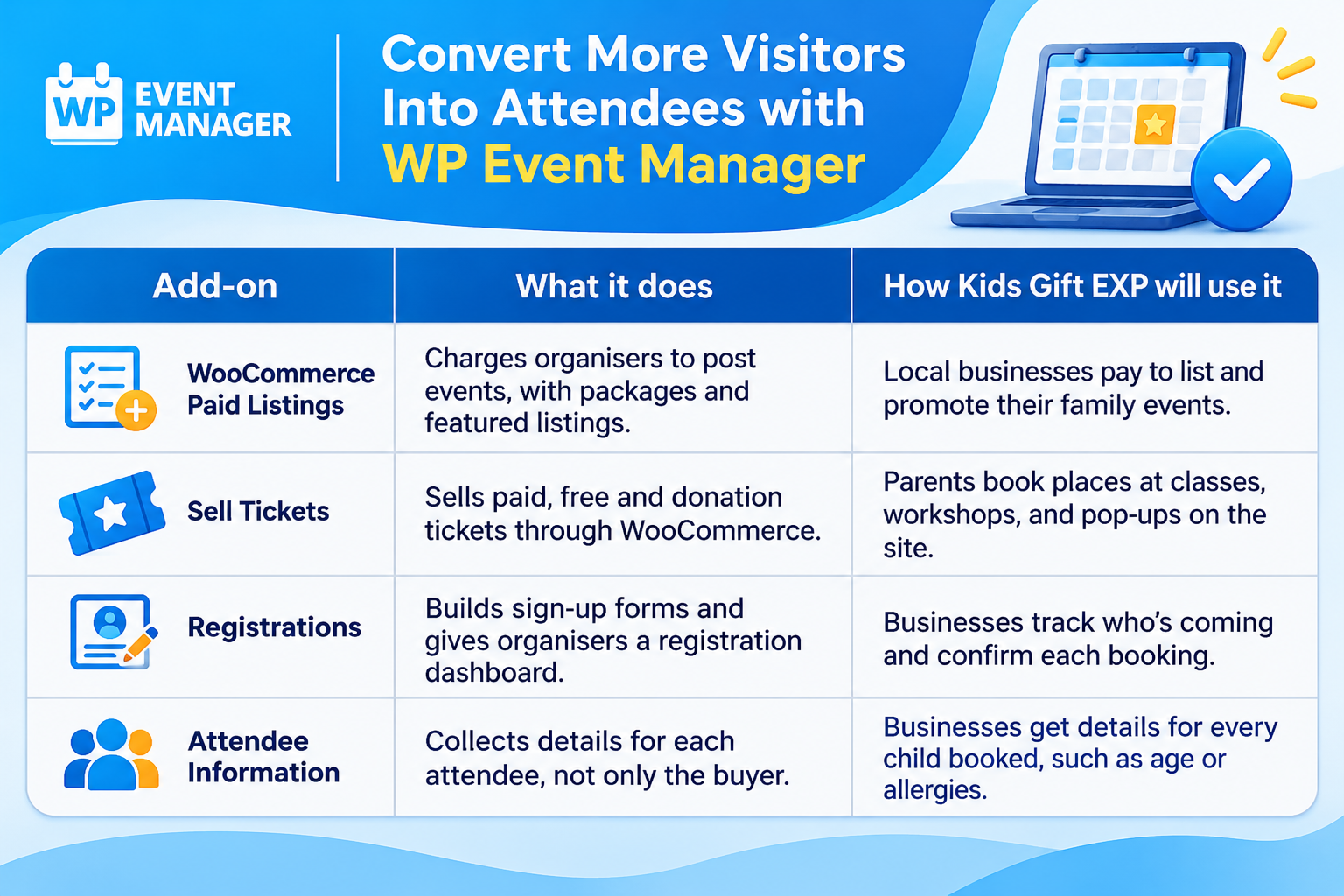
Mrs Elizabeth bought four add-ons, and each one covers a different step. The business pays to put its event on the site, then families sign up or buy a ticket, and on the day, the business has the details of every attendee. She's still setting everything up, so what follows is how she plans to use each add-on rather than how it's working so far.
WooCommerce Paid Listings Turns Event Posts Into Income
Businesses already pay to reach families on Kids Gift EXP, and events follow the same model. With paid event listings, a business picks a package and pays before its event goes live.
- Mrs Elizabeth can offer several packages, each with its own limit on how many events it includes.
- A featured event package can be priced higher, so businesses can pay to be seen first.
- Businesses choose a package and check what's left in it from their own dashboard.
- Payments go through WooCommerce and most major payment gateways.
Sell Tickets Handles Paid, Free and Donation Events
Kids' events range from free story times to paid baking classes. The Sell Tickets add-on lets businesses sell event tickets on WordPress without sending parents to another website.
- Each event can have paid, free, or donation tickets, or a mix of them.
- Min and max limits per order and a stock count stop small classes from overbooking.
- Parents get PDF tickets by email and can download them again from their account.
- Coupons work with tickets, which fits the gift-giving side of the platform.
How Registrations Keeps Track of Who's Coming
Sell Tickets needs Registrations to work, and it's the part businesses on Kids Gift EXP will open the most. All bookings show up in one list, which helps when a pottery class only has eight seats and the owner needs to know who's got one. Because it's an event registration plugin for WordPress, Mrs Elizabeth looks after it from the WordPress dashboard she's already working in.
- There's no fixed form. A dessert tasting might only want a name and email, but a science workshop can add questions about age and experience.
- Organisers mark bookings as confirmed, waiting, or cancelled, then sort through them by status or sign-up date.
- A parent gets a confirmation email the moment they register. The organiser hears about it too.
Attendee Information Collects Details for Every Child
Parents often book for siblings or a couple of friends in one go. Mum or Dad pays, but the workshop needs to know about each child. The Attendee Information add-on sorts that out, letting organisers collect attendee information for each ticket while the parent is checking out. Some events don't need that much, and there's an option to take the buyer's details only.
- Questions change from event to event. Nut allergies come up a lot for cookery classes, and climbing centres usually want an age and an emergency number.
- There's a setting to show who's attending on the event page itself.
- Organisers can download everything as a CSV file and print it as a check-in sheet for the day.
What Kids Gift EXP Expects at Launch
Kids Gift EXP hasn't launched its events section yet, so there are no results to report. Once it goes live, Mrs Elizabeth expects:
- Parents to find one-day family events in their area in the same place they already look for activities and gift ideas.
- Local businesses to post and promote their own events through paid listing packages, adding a new source of income for the platform.
- Paid and free events to be booked on the site itself, with tickets and confirmations sent automatically.
- Businesses to arrive at each event with the details they need about every child attending.
- Travelling families to use the events section to plan days out in a new city.
We'll come back with an update and real numbers once the events section has been running for a few months.
What Other Marketplace Sites Can Learn From Kids Gift EXP
- Add events to a directory you already run, so visitors who come for one thing find a reason to come back every week.
- Let businesses pay to list events, and the events section can pay for itself from the start.
- Plan the full path, from listing to ticket to attendee details, before launch rather than adding pieces later.
- For kids' events, decide early what you need to know about each child since the buyer is usually not the one attending.
Build Your Own Family Events Website With WP Event Manager
Marketplaces, directories and local guides can all run their events on WP Event Manager. The core plugin consists of listings, venues, organizers, search and a submission form through which users can send events to your site. Extras consist of premium listings, tickets, and registration options. Thus, you can either purchase what your site requires or buy a package.

About the Author