Use coupon code:
  Something exciting is coming soon – stay tuned to find out! 🚀✨
- « Previous blog
-
Grow My Business
-
Dec 18, 2025
-
Dec 18, 2025
-
711
-
0
- Next blog »
Most brands and businesses prefer WordPress as a website building platform due to its ease of use and flexibility. Whether you are a business owner, blogger, or developer, choosing WordPress is certainly the best decision you have made for your website, but that is not enough to make it successful. In fact, selecting a sophisticated theme and useful plugins to enhance features also do not guarantee a remarkable website.
To ensure that your website does not fail, you must be aware of the common WordPress mistakes that most beginners make. In this article, we have mentioned all these common WordPress mistakes to help you avoid them. Let us explore them.
9 Common WordPress mistakes that most beginners make
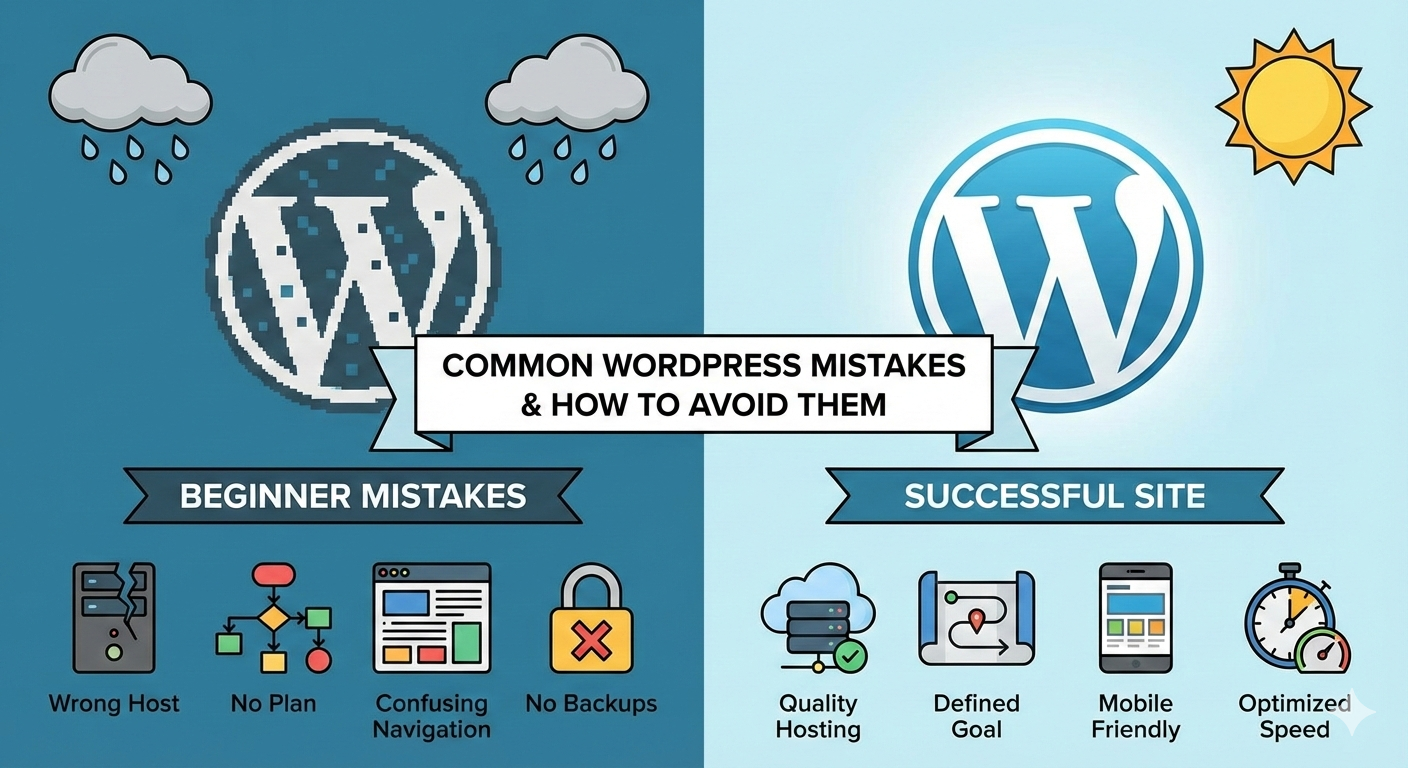
1. Failing to find the right host
Selecting the right host for your website is one of the most critical decisions that you need to make while building a website. It creates the base of your website. Most beginners fail to understand the importance of picking up a good webhost annd pick the cheapest that comes in their way. This WordPress mistake can get your website in trouble.
The consequences of choosing a poor host include:
- Slow website speed.
- Unable to handle heavy traffic.
- Security issues.
- Unsatisfactory customer support.
All these issues are not only dangerous for your website but also risk your business reputation.
On the other hand, the webhost helps you:- Fast loading time.
- Tightened security.
- Increased scope of growth.
- Quick and smooth WordPres installation.
- Better support.
To avoid this common WordPress mistake, you can rely on a good web host like Kinsta.
2. Not preparing a proper plan
Building a new website is undoubtedly an exciting experience for developers. However, due to this excitement, many developers jump into the process without preparing a solid plan. Setting goals and moving ahead with a plan always make the process smooth. To avoid this common WordPress mistake, create a detailed plan for your website by asking the following questions to yourself:
- What pages do you need on your website?
- What is the main objective behind building the website?
- Who are your target audiences?
- What actions do you want the visitors to take?
The planning phase is critical, and skipping it can be the biggest WordPress mistake for your business website.
3. Designing without a clear goal
Majority of website owners or developers look for a good looking website but you might be surprised to know that a good looking website is not always useful. it may attract visitors initially, but once they enter, they simply get lost on it. Every page on your website must be able to encourage visitors to sign up, find more information about your website, read a blog, or make a call. A good looking but cluttered website will only misguide visitors.
A wide range of designing options may get you confused in picking up the right ones for your website, but this can be easily avoided with the right plan and clear goals. It will help visitors with the right directs on how to browse through the information on your website.
4. Wrong theme selection
WordPress themes determine the overall appearance of your website. It is like creating the face of your online shop. WordPress offers both free and paid themes, and developers often get lured with the word "free" while choosing a suitable theme for their website. Free does not necessarily mean free, but they often come with certain risks like:
- Affecting your website speed.
- Poor support.
- Security concerns.
- Lack of updates etc.
Paid theme saves you from all of the above mentioned risks.
Whether you are picking up a paid or free theme, make sure it has te following features:
- Neat and clutter free designs.
- Responsive layouts..
- Fast loading.
- Timely updates.
- Better reviews.
Finalizing a theme that is free or only looks good is a common WordPress mistake, but you can avoid it by considering the above mentioned features before choosing one.
5. Confusing navigation menu
Even a well-planned and carefully designed website can fail if the visitors struggle to determine what to do next on your website or if they do not find the information they are looking for. It does not take long for them to switch. Your website's user experience highly depends on its navigation menu. Cluttered and unclear navigation menu frustrate user making it mandatory for you to have a clear navigation menu.
Consider the following points to improve your navigation menu:- Add easily understandable menu labels.
- Categorize similar pages.
- Highlight crucial action areas.
Your website user experience plays a pivotal role in converting website visitors into customers. Get feedback from them to understand if you navigation menu works for them or you need to improve.
6. Neglecting mobile design
Making your website design responsive has become mandatory for website owners as 90% of website traffic comes from mobile devices. Consider reading our previous blog on how to create a mobile friendly WordPress site.
Creating a website that only looks good on desktops and not on mobile devices means losing a huge number of visitors. That is why it is necessary for you to choose website designs and layouts considering the responsiveness factor in mind.
For example, all the WP Event Manager event themes come with responsive designs to ensure that your events website look good on all devices.
7. Skipping accessibility basics
Accessibility can feel like an advanced topic, but it’s something every site should include from the beginning. If your site is hard to read, navigate, or interact with, you could be locking out a big group of people.
Simple things make a big difference. Use readable font sizes, make sure your text has enough contrast against the background, and add alt text to your images so screen readers can describe them.
8. Avoiding backups
Having a backup for your website data is as important as keeping an eye on WordPress updates. Beginners have a common tendency of avoiding or delaying their WordPress updates which can increase the risk of site hacks. It is recommended for every website owner to backup their site before updating.
You can go for auto backups to ensure that your data remains safe even if it is hacked. This is like insurance that keeps your data safe. This is one of the most important part of building and maintaining a WordPress site.
9. Not optimizing website speed
Your website speed is another factor that determines its user experience. If your website takes longer to load, visitors do not think twice before switching to your competitor's site.
Your website speed depends on the following things:
- Images in your site that are not compressed.
- Overloading website with too many plugins.
- Poorly coded themes.
These factors are often overlooked by beginners and end up degrading the quality of it. Make sure you take care of your website images, plugins, themes, and deigns to optimize your site for speed. You must also keep an eye on your website speed and take action if you notice your website has suddenly become slow.
Wrapping up
We hope that this article will help you rectify and avoid common WordPress mistakes that most beginners make unknowingly. Whether you are a beginner or an expert, this checklist will keep you alert about the common WordPress mistakes and helps avoid them.
About the Author