Use coupon code:
  Something exciting is coming soon – stay tuned to find out! 🚀✨
- « Previous blog
-
Events
-
Jan 2, 2026
-
Feb 6, 2026
-
1243
-
0
- Next blog »
Running events passes through a lot of hard work, dedication, planning, and perfection. Right from switching various platforms to connecting with the team for task allocation and attendee management, it's a real challenge. Besides this, tasks like registration and ticket sales management, marketing, etc also give sleepless nights to event planners. These tasks are extremely error prone when handled manually.
This is where automation tools like Zapier helps. If you are still struggling to manage events efficiently read this article to know how Zapier automates major event management tasks to simplify the process.
You can connect your WordPress event management platform like WP Event Manager with thousands of apps as per your preference to automate event management and its recurring tasks without coding using Zapier. It is a game-changing tool for event planners that helps automate major event operations, saving time and effort.
Before diving into the main topic let us give you brief introduction to Zapier and event automation.
Introduction to Zapier and event automation
Zapier is a coding free automation tool that links your event management platform to various apps to automate event operations eliminating manual effort. Such event operations may include attendee communication, registration management, marketing, managing reminders, and more by triggering actions in specific events.
This helps event organizers remove the scope of error and focus on creating an engaging events. Now let us find our how Zapier automate event management tasks.
Automate event management with Zapier
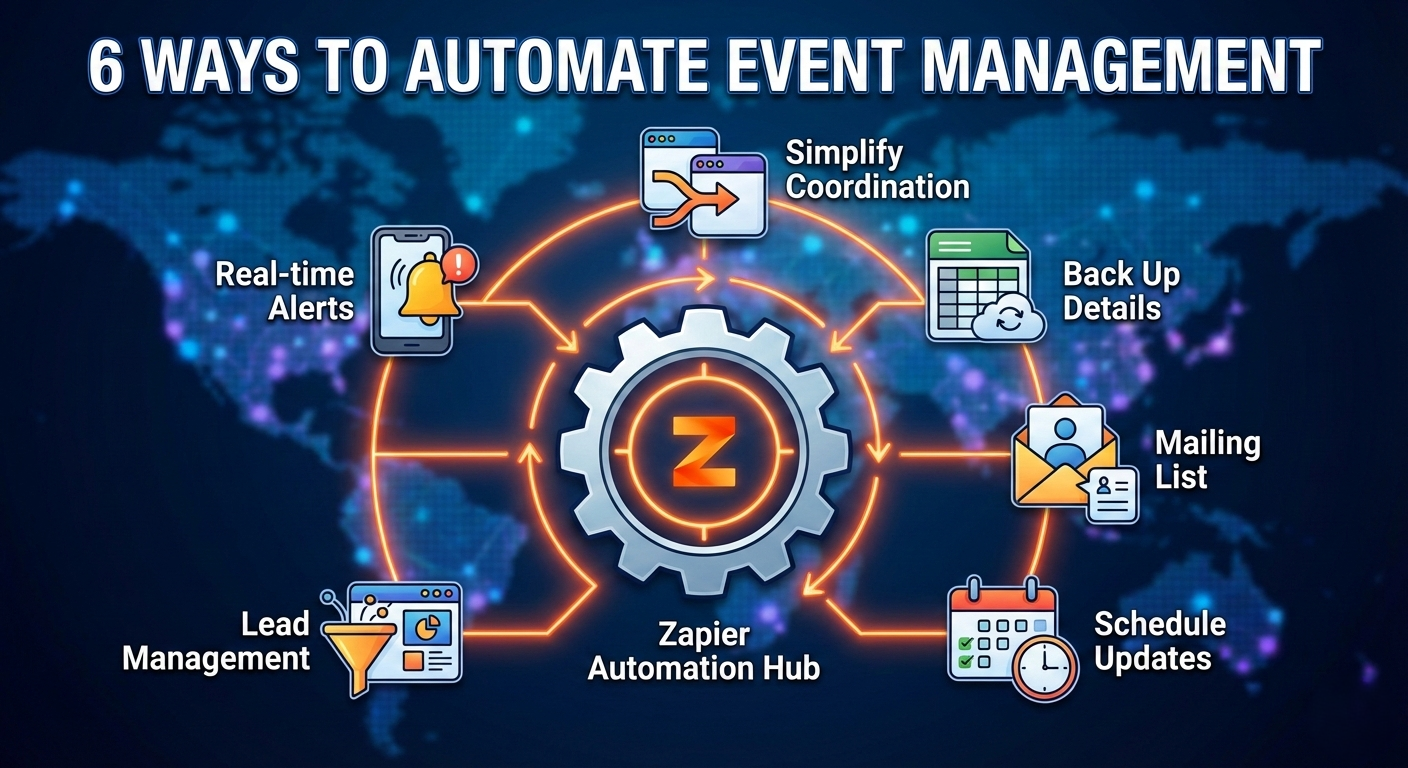
1. Simplify event coordination across platforms
The process of event management covers a lot of tools for calendar integration, ticketing & registration management, attendee handling, marketing, and switching between multiple platforms. Syncing these systems manually can be overwhelming for the event organizers, especially when a bushiness grows. That's when automation comes as a savior. With Zapier, you can automate the flow of information among all your event management tools and significantly reduce manual effort.
2. Back up event details
Tracking crucial event details can be stressful for event organizers, especially when a huge number of attendees are involved. Similarly, when you run multiple events simultaneously, the challenge becomes even tougher.
The best way to deal with this situation is to store the event data, including registrations, attendee actions, and more, in a spreadsheet as backup. This makes the data easily accessible through a single platform.
Zapier automatically transfers these details from your event platform to a spreadsheet and update it in real time streamlining the entire system without any manual intervention. This way, you can ensure a smooth entry and maintenance of your event data in a centralized platform.
3. Add attendees to your mailing list
Including all your attendees to your mailing is an amazing way to stay connected with them, share updates, and keep them engaged even after your event ends. Doing it manually is laborious and time consuming, but when you are with Zapier the process becomes automated that helps you save time and ensure no one is missed.
Zapier allows you to automate the entire process right from adding new attendees to updating the existing ones. It sends all the attendee details to your email marketing tool to help you create a personalized event experience. Starting from sending event invitations and reminders to post event feedback or thank you email having an updated mailing list strengthens your marketing strategy and improves campaigns.
4. Automate calendar updates and scheduling
Zapier also helps manage your event schedules systematically through a calendar. Automating the schedule management system through a calendar ensures that you never miss important dates related to your event, including registration deadlines, meetings, etc.
Zapper takes event information from your event platform that includes new events, registration details, and more to create new events in Google calendar based on that. This helps you manage your event-related tasks on time, making the process smooth for you and your team.
5. Automate lead management
Events create an amazing platform for businesses to generate leads, but it can be tricky if attendee data is managed manually. Automating the attendee tracking system allows you to keep an eye on every attendee data and update it accordingly in your CRM tool. It bridges the gap between you and your attendees, giving you the scope to know them better without maintaining multiple spreadsheets.
Zapier automatically sends the details of your new attendees to your CRM tool to help you systematically manage the data and ensure that every attendee is informed and updated about your event without fail.
6. Automate notifications for real-time updates
Keeping your attendees updated about any last minute changes of your event is your responsibility as an event organizer, and it is crucial for your event success. When you have an automated notification system, the task becomes easier for you. This saves time and removes the risk of missing important updates.
You can connect Zapier with various communication platforms like Slack or email through which it sends your team real time notification such as new event or registration notification. Similarly, you can also automate sending notifications to your attendees and registrants regarding event updates.
Zapier is one of the best tools to automate event management and that is why WP Event Manager has joined hands with the platform to offer a smoother event management experience to its clients.
Automate event operations with Zapier and WP Event Manager
Considering the need for automation in the event industry, WP Event Manager has newly launched a premium add on named Zapier Integration. It offers the combined strength of WP Event Manager and Zapier to automate major event management tasks.
Its key features include:
- Real time task automation.
- Allows admins to choose workflows to automate as per requirements.
- Offers full control to admins to choose event specific triggers.
- Detailed Zapier dashboard for event organizers.
- Zap activity log for event organizers to access past event triggers and their status..
- Advanced customization.
- Multi app work flow and more
To get all the features, discover the plugin now!
If you want to automate event management then go for the Zapier integration of WP Event Manager for a smoother workflow.
About the Author